
AI Agent Workflows: 12 Practical Automation Examples
Explore 12 practical AI agent workflows for research, monitoring, content, sales, and operations, with a six-step blueprint for reliable automation and review.
AI agent workflows turn a goal into repeatable work. Instead of answering one prompt, an agent can collect context, choose tools, complete several steps, check the result, and deliver an output on a schedule or in response to an event.
Adoption is broad, but execution still lags. McKinsey's 2025 global survey found that 88% of organizations regularly used AI in at least one business function. Only 23% were scaling an agentic AI system, while another 39% were experimenting (The State of AI, 2025).
That gap is where workflow design matters. The examples below show how to combine triggers, connected apps, persistent context, review rules, and clear outputs without trying to automate an entire job at once.
Key Takeaways
- Start with one frequent, measurable, low-risk loop.
- Give the agent a trigger, context, tools, a stop condition, and a delivery target.
- Use human approval before irreversible or high-impact actions.
- McKinsey found 23% of organizations were scaling an agentic AI system in 2025, so most teams still have room to learn from focused pilots.
In this guide
- What an AI agent workflow is
- Which workflows to automate
- Twelve practical examples
- A six-part reliability blueprint
- Human review and approval points
- Frequently asked questions
What Is an AI Agent Workflow?
An AI agent workflow is a repeatable sequence in which an agent interprets a goal, chooses steps, uses tools, checks results, and stops or asks for help. Microsoft reported that 46% of leaders said their companies were already using agents to fully automate workflows or processes (2025 Work Trend Index, 2025).
The workflow supplies structure; the agent supplies judgment within that structure. OpenAI describes an agent as a system that manages workflow execution and dynamically selects tools, while a workflow is the sequence of steps needed to meet a goal (A Practical Guide to Building Agents, 2025). In other words, fixed automation follows the path its designer wrote, while an agent decides which permitted path fits the situation. Anthropic makes the same distinction and describes five reusable patterns: prompt chaining, routing, parallelization, orchestrator-workers, and evaluator-optimizer (Building Effective Agents, 2024). This distinction keeps the architecture honest. If stable rules can solve the task, a fixed workflow is simpler. If the work requires judgment over changing context, an agent may earn its added complexity.
| System | Best for | How it behaves | Example |
|---|---|---|---|
| Chatbot | One-off questions | Responds to a user message | Explain a return policy |
| Fixed automation | Stable rules and structured inputs | Runs the same predefined path | Copy a form response into a database |
| AI agent workflow | Multi-step work with changing context | Chooses tools and adapts within boundaries | Research an account, draft a brief, and request approval |
The most useful unit of automation is usually a loop, not a job title. "Prepare the Monday competitor brief" is testable. "Handle marketing" is not. A narrow loop gives you a clear trigger, output, quality bar, and person who owns the result.
Which AI Agent Workflows Are Worth Automating?
Start with work that repeats, uses unstructured information, and ends in a result someone can judge. McKinsey found that 23% of organizations were scaling agents and 39% were experimenting in 2025. That gap favors bounded pilots with measurable outputs over broad, open-ended mandates (McKinsey, 2025).
Look for five traits:
- The trigger is easy to name. A schedule, new form, changed record, or user request starts the work.
- The outcome is observable. The agent produces a brief, alert, updated row, draft, shortlist, or report.
- The task needs judgment. The work involves research, exceptions, messy documents, or changing websites. If every rule is stable, fixed automation may be better.
- The agent can reach the required context. It has the right files, memory, websites, and approved integrations.
- A failure has a safe path. The agent can retry, stop, escalate, or ask for approval without causing irreversible damage.
Can you describe the trigger, result, and reviewer in one sentence? If not, narrow the task before adding tools.
Use a simple score before building. Rate frequency, clarity, and time cost from 1 to 5. Subtract the risk and exception score. A high-frequency task with a clear output and modest downside is a good first candidate. A rare task that moves money or changes access rights is not.
| Candidate | Frequency | Output clarity | Risk | First-workflow fit |
|---|---|---|---|---|
| Weekly competitor brief | High | High | Low | Strong |
| Inventory alert | High | High | Low | Strong |
| Customer reply draft | High | High | Medium | Strong with review |
| Autonomous refund approval | Medium | Medium | High | Poor starting point |
12 Practical AI Agent Workflow Examples
Useful AI agent workflows exist across research, operations, sales, support, and content. Gartner predicts that 60% of brands will use agentic AI for one-to-one interactions by 2028, spanning marketing, sales, and support. The practical starting point is still one bounded loop with a named owner (Gartner, 2026).
1. Competitive research brief
Trigger: A weekly schedule. Agent work: Search approved sources, compare product changes, capture links, and summarize what changed since the last run. Review: A strategist checks the claims and decides what matters. Persistent AI agent memory helps the agent avoid treating every week as a blank slate.
The output should separate observed facts from interpretation. Ask for dates, direct links, and a short "why this matters" section. That makes the brief easier to audit and more useful than a pile of search results.
2. Lead and account research
Trigger: A new lead or CRM stage change. Agent work: Research the company, product, recent events, likely needs, and relevant contacts. Review: A seller corrects the account brief and approves any message before it leaves the company.
Use inbound webhooks when a form or CRM event should wake the agent. Pass stable record IDs and a source URL in the event. Keep lasting qualification rules in the agent's instructions instead of repeating them in every payload.
3. Meeting follow-up
Trigger: A transcript or meeting note arrives. Agent work: Extract decisions, owners, deadlines, open questions, and a follow-up draft. Review: The meeting owner confirms the summary and edits the message before sending.
This workflow is valuable because the success criteria are visible. Every action item needs an owner and date. Every unresolved question stays unresolved rather than becoming an invented decision. Deliver the result to a document, project tool, or team channel after approval.
4. Support ticket triage
Trigger: A new ticket. Agent work: Classify the issue, inspect account context, search the knowledge base, and draft a reply with cited sources. Review: A support agent approves customer-facing text and handles policy exceptions.
Route billing, security, product, and general questions into different playbooks. If context lives behind a customer portal, authenticated website access lets the agent work within a permitted session instead of relying on public pages alone.
5. Inventory and price monitoring
Trigger: A schedule. Agent work: Check selected storefronts for a scarce item, SKU, or price threshold. Review: Usually none for an alert, but purchasing remains with the user unless explicit approval rules say otherwise.
This was one of the original workflows shared in this newsletter. It works because the state change is objective: in stock, out of stock, or below a target price. The agent can send an email or SMS with the product link and observed price. Try the inventory monitor.
6. Creator autopilot
Trigger: A content calendar or publishing schedule. Agent work: Research a topic, draft a script, prepare captions and titles, run a quality checklist, and queue approved assets. Review: A creator checks facts, voice, rights, and final publication.
The workflow can support cooking videos, technical explainers, or educational threads without turning creative direction over to a machine. Add agent-driven video generation when the brief calls for an original clip, then keep the same editorial approval gate. Try the creator workflow.
7. Spreadsheet enrichment
Trigger: New or incomplete rows. Agent work: Research each record, normalize fields, add source URLs, flag uncertain matches, and write approved results into a sheet. Review: The owner samples changes and resolves low-confidence rows.
A Google Sheets AI agent can maintain a research queue, update status columns, and create a handoff for exceptions. Use stable IDs to prevent duplicate work. Separate raw evidence from the agent's interpretation so a reviewer can trace every update.
8. Candidate sourcing
Trigger: An approved role brief. Agent work: Search for potential candidates, compare public professional evidence with the stated criteria, remove duplicates, and organize a shortlist. Review: A recruiter validates every recommendation and owns outreach and hiring decisions.
The AI candidate sourcing workflow should use job-related criteria only. Keep protected characteristics out of the scoring process, record the source behind each claim, and treat the shortlist as research to review rather than an automated hiring decision.
9. Authenticated portal operations
Trigger: A schedule or requested task. Agent work: Sign in through an approved session, collect records, update a status, or download a report from a site that lacks a practical API. Review: Require approval before destructive changes, submissions, or external messages.
This pattern fits vendor portals, internal tools, and older business software. Define the permitted sites and actions. Store durable rules in custom agent instructions and stop when a page, permission, or amount falls outside the expected range.
10. Content repurposing and distribution
Trigger: A new approved article, webinar, or report. Agent work: Produce channel-specific drafts, crop the core message for each format, prepare metadata, and schedule approved variants. Review: A marketer checks claims, tone, and channel fit.
One source should not become twelve identical posts. Give each channel a purpose and length limit. Preserve the original link and source notes so a reviewer can spot claim drift. The agent handles repeated formatting; a person still decides what is worth publishing.
11. KPI reporting and visualization
Trigger: A daily, weekly, or monthly schedule. Agent work: Collect defined metrics, compare them with the prior period, explain material changes, and produce a concise report. Review: An owner confirms the numbers and adds business context.
Ask the agent to separate data from explanation. A table should show exact values and periods; commentary should label uncertainty. Gobii agents can also turn collected figures into embedded data visualizations when a chart makes the change easier to understand.
12. Event-driven operations responder
Trigger: A form, billing event, project update, or system webhook. Agent work: Read the payload, retrieve related context, choose the matching playbook, and create the next safe output. Review: The risk level determines whether the agent posts, drafts, or pauses for approval.
Use one webhook per major source so secrets can be rotated independently. A billing failure might produce an internal summary, while a contract change might stop and alert an owner. The event begins the work; it should not silently broaden the agent's authority.
How Do You Design a Reliable AI Agent Workflow?
Reliable workflows make every handoff explicit. Microsoft found that 49% of more than 100,000 analyzed Copilot conversations supported analysis, problem-solving, evaluation, or creative thinking. The design question is not merely whether an agent can act. It is what starts the work, what evidence it needs, and where it must stop (2026 Work Trend Index, 2026).
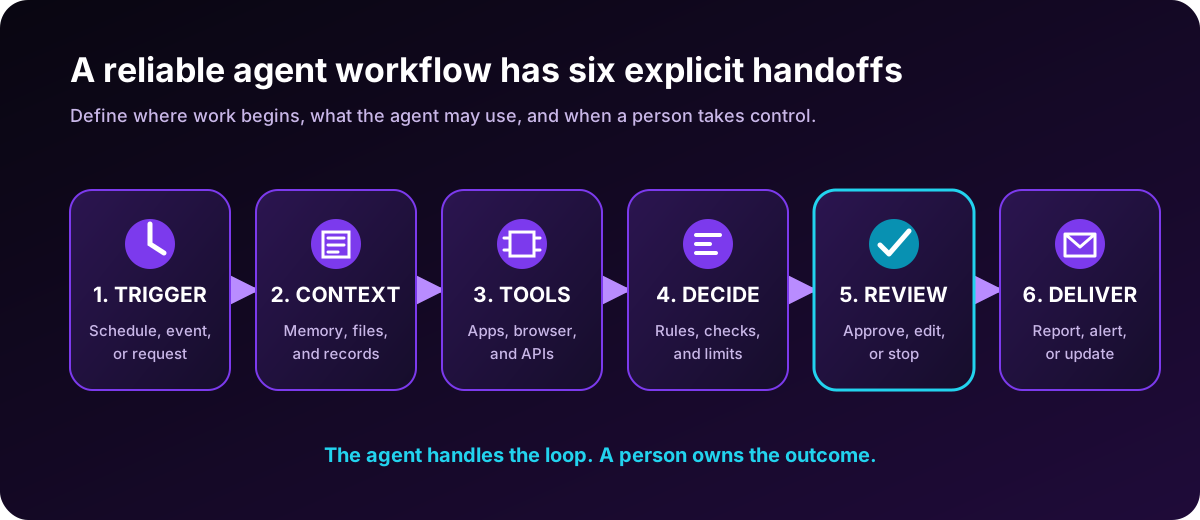
Build the workflow in six parts:
- Trigger: Name the schedule, event, or request that starts the run.
- Context: List the files, memory, records, and websites the agent may use.
- Tools: Grant only the integrations, APIs, or browser access needed for the task. MCP-connected tools can expand reach without changing the workflow's goal.
- Decision rules: Define the quality bar, thresholds, allowed retries, and edge cases.
- Review: State which outputs can ship, which require approval, and which must stop.
- Delivery: Choose the destination and format, such as a sheet, email draft, report, or team channel.
In our experience designing persistent workflows, separating durable instructions from new event data makes failures easier to inspect. The instructions explain how the agent should behave. Meanwhile, the timeline shows what arrived and what the agent did. If an output is wrong, you can identify whether the problem came from the rule, the source data, or the tool result.
Start with one agent. OpenAI recommends adding tools to a single agent before introducing a multi-agent architecture, because extra orchestration adds overhead. Split the work only when instructions become crowded, tools overlap, or distinct specialists need separate context (OpenAI, 2025).
A workflow is ready to test when you can write its acceptance test in one sentence. For example: "Every Monday by 9 a.m., deliver five verified competitor changes with dates and source links, and flag anything uncertain." If the test is vague, the workflow is still too broad.
What happens when a source is missing, a login expires, or two instructions conflict? Write that stop condition before the first live run.
Where Should Humans Stay in the Loop?
Human review belongs where an error would be costly, irreversible, private, or difficult to detect. In Microsoft's 2026 survey, 50% of AI users said quality control was becoming more important, 46% named critical thinking, and 86% treated AI output as a starting point rather than a final answer (Microsoft, 2026).
| Risk level | Example | Recommended control |
|---|---|---|
| Low | Internal research brief | Agent delivers with sources; owner samples quality |
| Moderate | Customer reply or CRM update | Agent drafts; person approves before action |
| High | Refund, purchase, contract, or access change | Explicit approval with the exact action and amount |
| Outside scope | Unknown site, missing permission, or conflicting instruction | Stop and escalate |
OpenAI recommends human intervention when an agent exceeds failure thresholds or prepares a high-risk action. NIST's AI Risk Management Framework adds four continuous functions: govern, map, measure, and manage. It also calls for defined human oversight, production monitoring, and appeal or override mechanisms (NIST AI RMF Core, 2023).
Put the approval as close as possible to the consequential action. A reviewer should see the evidence, proposed action, destination, and expected effect in one place. For browser tasks, the same principle supports sandboxing AI agents in production: limit access, record what happened, and make recovery possible.
Would you let the action continue if the reviewer saw only the summary? If not, the approval screen should expose the underlying evidence too.
Frequently Asked Questions About AI Agent Workflows
Advanced workflow habits are still uncommon. Microsoft's 2026 Work Trend Index classified 16% of surveyed AI users as Frontier Professionals who use agents for multi-step work and routinely redesign workflows. The same report found that 66% of AI users spent more time on high-value work and 58% produced work they could not have created a year earlier (Microsoft, 2026).
What is the difference between an AI agent and an AI agent workflow?
An AI agent is the system that reasons and uses tools. An AI agent workflow is the repeatable path that agent follows from a trigger to a result. The workflow defines the context, tools, checks, approval points, and delivery channel that make the agent's work reviewable and repeatable.
Do AI agent workflows require code?
Not always. Many workflows can start with plain-language instructions, a schedule, approved integrations, and a clear review step. Code becomes useful when you need custom APIs, strict validation, or application-managed agent lifecycles. Begin with the simplest setup that can meet the acceptance test.
What is the best first AI agent workflow?
Choose a frequent, low-risk task with a clear output. A weekly research brief, spreadsheet enrichment run, meeting summary, or inventory alert is easier to test than a broad autonomous role. Avoid money movement, account deletion, and other irreversible actions until the workflow has a dependable record.
How should you measure an AI agent workflow?
Track completion rate, correction rate, time saved, source quality, escalation rate, and cost per accepted result. Compare those measures with the previous process. Activity alone is not success. A workflow that runs often but creates rework, weak evidence, or missed exceptions needs a smaller scope or better controls.
The best first workflow is not the most impressive one. It is the smallest useful loop you can run repeatedly, inspect honestly, and improve from evidence.
About the author: The Gobii Team builds and operates persistent browser-native AI agents. The team focuses on useful automation, clear review points, and dependable long-running work. Meet the team.