
Set your agent instructions once
Gobii Custom Instructions let teams save personal and organization-level rules once so new agents inherit consistent behavior.
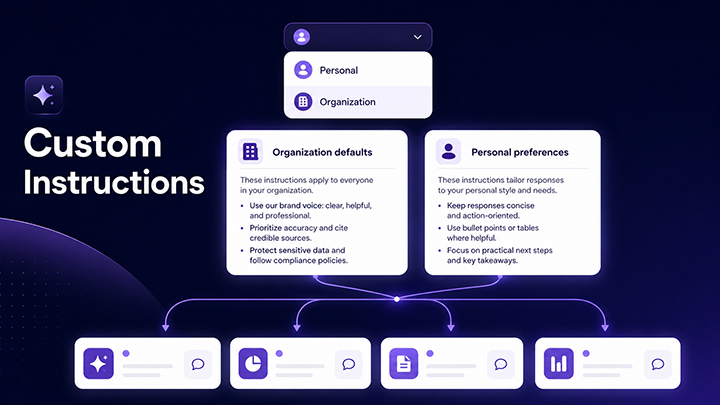
Every team has instructions that should not need to be pasted into every new agent.
Maybe your agents need a specific tone with customers. Maybe they need to follow a standard research process, call an internal API in a particular format, or respect a policy boundary that is obvious to your team but not obvious to a brand-new agent.
Custom Instructions give those rules a permanent home. Set them once at the personal or organization level, and new Gobii agents can inherit the right operating context from the start.
Quick Summary - Custom Instructions store repeatable rules, tone preferences, boundaries, and process requirements. - Organization instructions create a shared baseline for team-owned agents. - Personal instructions let individuals keep their own working style without rewriting the same setup notes.
What Custom Instructions Control
Custom Instructions define the standing context your agents should carry before a task begins. They are useful for tone, rules, boundaries, workflow preferences, API conventions, reporting formats, and anything else that makes an agent behave like part of your team.
The goal is not to make every agent identical. It is to stop repeating the same setup notes whenever you create, share, or adjust an agent.
If you are using Meta Gobii to manage a fleet of agents, Custom Instructions give that fleet a shared operating baseline instead of a pile of per-agent reminders.
Organization Instructions
Organization instructions are for rules that should apply broadly across team-owned agents. Admins can define shared defaults so organization agents follow the same compliance requirements, tone guidelines, process rules, and operating conventions without each agent needing to be configured one by one.
This is especially useful when agents touch customer communication, internal systems, regulated workflows, or repeatable business processes. The instruction lives at the organization level, so a new agent starts with the baseline your team already agreed on.
Custom Instructions also pair naturally with organization templates and member creation controls. Templates define the starting shape of an agent. Organization instructions define the shared rules it should carry.
Personal Instructions
Personal instructions are for individual working style. A person can save their own tone, workflow preferences, formatting habits, and recurring context without changing the organization baseline for everyone else.
That means an agent can follow the organization's rules while still adapting to the person using it. In practice, this keeps team governance and personal ergonomics from fighting each other.
A Practical Use Case
The first use case came from an organization that needed every agent, from the CEO's executive assistant to the support triage bot, to handle a specific custom API call.
Instead of baking that API convention into every single agent config and hoping nobody forgot, they set one organization-wide instruction.
Done.
Every agent now follows the same protocol. Every new agent inherits it automatically. No copy-paste. No drift. No forgotten rules.
The power is not just consistency. It is velocity. When a team no longer has to remember the same invisible setup step, new agents become easier to trust and faster to launch.
That consistency pairs with Gobii's recent reliability improvements: agents are easier to trust when their behavior and infrastructure both stay predictable.
It also complements Agent Skills for repeated workflows. Skills help agents repeat a learned workflow. Custom Instructions give them the standing rules and preferences to apply while doing that work.
When To Use Each Level
Use organization instructions for anything the whole team should inherit: policy requirements, customer tone, API conventions, output formats, escalation rules, or standard operating principles.
Use personal instructions for the details that should follow one person: preferred brevity, reporting format, meeting style, research depth, or how they want agents to summarize decisions.
If a rule should survive employee handoffs, put it at the organization level. If it only reflects one person's taste, keep it personal.
Where To Set Them Up
Custom Instructions live in Gobii profile settings. Open Settings, then select Profile.
On your personal profile, save your own tone, workflow, and preferences. On the organization profile, set shared defaults for every agent in the organization. You must be an organization Owner or Admin to edit organization-level instructions.