
Connect MCP Servers to AI Agents With Gobii
Connect MCP servers to Gobii AI agents with remote URLs, local commands, headers, or OAuth, plus three ownership scopes and secure, controlled tool access.

An AI agent becomes far more useful when it can reach the systems where work lives. A connected MCP server gives a Gobii controlled access to tools and data beyond its default capabilities: perhaps an internal service, hosted application, database interface, or purpose-built workflow. Direction matters because Gobii acts as the MCP client. It connects outward, discovers the tools a server exposes, and can use them when its charter calls for them. This guide covers scope, connection type, authentication, assignment, testing, and troubleshooting.
Key takeaways
- Connected MCP flows outward.
- Gobii supports three ownership scopes plus remote URLs, self-hosted local commands, headers, environment-style secrets, and OAuth authorization for hosted services.
- Assign only the servers an agent needs, then verify discovery and behavior with a narrow test task.
What Is a Connected MCP Server for an AI Agent?
A connected MCP server is an external service whose tools and data become available to an assigned Gobii. Gobii is the client in this relationship. It connects to the server, discovers its supported operations, and selects an appropriate tool while working on a task (Gobii, MCP Servers, retrieved July 18, 2026).
The Model Context Protocol defines a common way for AI applications to exchange capabilities with servers. An MCP-compatible service describes its operations through that shared protocol. Each operator still controls what those operations do, which credentials they require, and which underlying systems they can reach; Gobii controls assignment and tool selection. This division suits private or specialized capabilities. One team might expose an approved customer lookup, while another provides deployment status, document search, or a business-specific action absent from a general integration catalog. The MCP endpoint packages that interface for a longer-running Gobii workflow.
Connected MCP and Remote MCP Use Opposite Flows
Connected MCP and Gobii Remote MCP are opposite flows. Use a connected server when a Gobii needs outside tools. Use Gobii Remote MCP when an outside AI client such as Claude Code, Codex, Hermes, or an internal MCP application needs to manage Gobii agents.
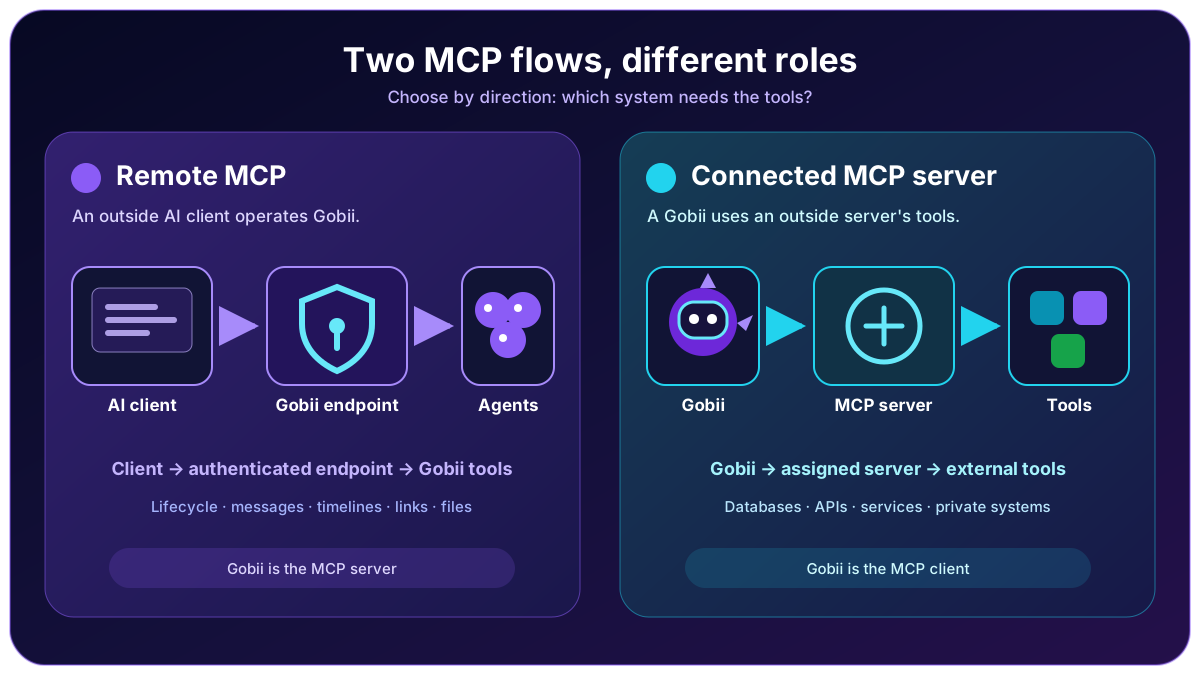
| Flow | Gobii's role | What becomes available |
|---|---|---|
| Gobii → connected MCP server | MCP client | The server's external tools and data become available to an assigned Gobii. |
| External AI client → Gobii Remote MCP | MCP server | Gobii's agent lifecycle, messaging, coordination, timeline, debugging, and file tools become available to the client. |
Direction defines trust. Connected servers receive Gobii requests under the authentication configured for that service. Remote MCP instead accepts outside requests under a Gobii API key. Although both use MCP, their credentials, features, setup, and failure modes differ; keeping the two surfaces separate makes permission reviews and debugging far easier.
Where Do You Manage MCP Servers in Gobii?
Use Advanced MCP Servers in the Gobii Cloud console. Self-hosted deployments normally use http://localhost:8000/console/advanced/mcp-servers/. From the relevant management screen, you can choose scope and connection type, configure authentication, test reachability, review the advertised tools, and assign the finished definition to specific Gobiis.
A practical setup sequence looks like this:
- Name the service and its intended environment.
- Choose the narrowest ownership scope.
- Select a remote URL or, on self-hosted Gobii, a local command that starts the server beside your deployment.
- Add headers, environment-style secrets, or OAuth. Keep descriptions free of credentials.
- Save, then test the connection before assigning production access.
- Assign one suitable Gobii and run a limited task that proves both discovery and behavior; record the expected result first so success is unambiguous.
A successful connection proves reachability, not assignment or useful tool metadata. Test those separately.
MCP Server Scope Choices
Choose the narrowest scope that matches the intended ownership. Gobii documents three scopes: platform, organization, and personal. Scope affects who owns the server definition and where it can be assigned; it does not replace the permission model enforced by the external service itself (Gobii, Server scopes, retrieved July 18, 2026).
| Scope | Best fit | Decision check |
|---|---|---|
| Platform | A centrally managed server intended for broad availability across the deployment. | Should administrators own and govern this definition for the whole platform? |
| Organization | A shared service for agents and people within one organization. | Does the server use organization-controlled credentials or reach organization data? |
| Personal | An individual connection or private experimental server. | Should this definition and its assignment remain tied to one user? |
Start with personal scope for a local prototype. A company-wide customer-service server backed by shared systems belongs at organization scope because that expresses ownership better than copied personal definitions. Before widening access, review credentials, tool descriptions, logging, data classification, and every system reachable behind the endpoint.
How Do Remote URLs, Local Commands, and Authentication Work?
Gobii supports two connection types. A remote URL connects to a hosted MCP endpoint over the network. A local command starts an MCP server process beside a self-hosted Gobii installation. Local commands are unavailable on Gobii Cloud because they require execution inside infrastructure you operate (Gobii, Connection types, retrieved July 18, 2026).
Remote servers commonly use one of three authentication patterns:
- Headers carry a fixed API key or bearer credential with each request.
- Environment-style configuration separates named secret values from descriptive fields, tool instructions, and agent-visible context.
- OAuth sends an administrator or user through the provider's authorization prompt, records the resulting grant, and lets the server use that connection for later requests without exposing its token to the agent.
For OAuth, save the server before starting authorization, then complete the provider prompt and confirm Gobii reports an active connection. Definition and grant remain separate states; an incomplete grant can leave a visible server whose tools are unusable. Never move the credential into chat, charters, descriptions, or source control. Use secret-specific fields, rotate anything exposed in conversation or logs, and remember that the external service remains responsible for validating identity and limiting operations.
How Do You Assign and Test an MCP Server?
After a successful connection, assign it from the Gobii's integration settings or MCP server management. Creating a definition does not expose tools to every agent, so two Gobiis in one organization can carry different tool sets. Start with a small, observable task: ask the assigned agent to perform a read-only operation against a known record or test environment. Confirm it chose the intended server, passed sensible arguments, and returned a recognizable result before trying a reversible write; high-impact actions deserve staging or server-side approval. When several servers offer similar capabilities, remove unused assignments or specify which system owns each task in the charter. Tool metadata also shapes selection. Vague operations such as run_action force too much inference, whereas a narrow name, precise input schema, and explicit description make safer choices easier.
How Should You Limit Tool Access and Protect Credentials?
Give each Gobii the smallest useful tool surface. Overlapping servers create extra choices, credentials, and routes to the wrong system; a lean set improves selection and makes behavior easier to audit. In our experience, the server definition, secret, and agent assignment are three separate decisions: what can connect, which external identity Gobii uses, and which worker may consider those tools. Reviewing each layer prevents a valid connection from becoming broader than its workflow requires.
Use these controls together:
- Match each assignment to the charter.
- Prefer read-only credentials while validating a new integration.
- Enforce a second permission boundary on the MCP server and its underlying API or database, independent of the Gobii assignment.
- Keep production and test endpoints in separate definitions with unmistakable names.
- Rotate exposed credentials immediately, then review provider-side audit logs for unexpected calls, affected records, and any follow-on activity.
- Remove a server assignment when the project or responsibility ends.
Protocol compatibility is not trust. Before connecting an unfamiliar server, review its operator, submitted-data handling, retention policy, and downstream reach.
What Should You Check When an MCP Server Fails?
Begin with the failing layer instead of rebuilding the entire connection. The current Gobii troubleshooting guide separates OAuth problems, missing tools, authentication errors, unexpected tool behavior, and self-hosted local-command failures.
| Symptom | Likely check | Next action |
|---|---|---|
| OAuth never reaches connected status | The authorization flow was not completed, the redirect failed, or the grant expired. | Restart OAuth from the saved server and complete the provider confirmation. |
| The server connects but the Gobii sees no tool | The server is not assigned, or the remote endpoint did not advertise the expected tool. | Verify assignment, then inspect the server's tool discovery response. |
| Tool calls return authentication errors | A header, environment value, token, or provider-side permission is invalid. | Test the credential against the intended environment and rotate it when necessary. |
| The agent chooses an unexpected tool | Several servers overlap, or names and descriptions are ambiguous. | Remove unused assignments, sharpen the charter, or improve server-side tool metadata. |
| A local command will not start | The executable, working environment, dependencies, or command arguments differ from the self-hosted runtime. | Run the command under the same service account and inspect its process logs. |
A connection test, assignment check, and one read-only call usually isolate the fault. Capture exact error text without copying secrets. Provider responses and audit logs often identify a missing scope or expired grant more precisely than an agent transcript.
What Changed in the Original MCP Release?
November 2025 also brought automatic agent summaries, automatic tags, and dashboard search. Those conveniences help organize a growing roster, but they remain separate from MCP connections. Later releases added one-click agent integrations for supported SaaS products and Remote MCP for outside AI clients. Prefer a native integration when it covers the workflow, a connected server for private or specialized MCP tools, and Remote MCP when another AI client operates Gobii.
Frequently Asked Questions
Setup choices recur. Before connecting a production service, consult the current MCP server documentation for the latest fields and constraints.
Is a connected MCP server the same as Gobii Remote MCP?
No. Connected MCP makes Gobii the client consuming outside tools. Remote MCP makes Gobii the server offering agent-management tools to an outside AI client. Direction, credentials, setup, and operations differ.
Can Gobii connect to hosted MCP servers?
Yes. Add the hosted endpoint as a remote URL, configure its required authentication, test the connection, and assign it to the intended Gobii. The endpoint must be reachable from the Gobii deployment and implement a compatible MCP transport and tool-discovery flow.
Can self-hosted Gobii use local command MCP servers?
Yes. A self-hosted deployment can start an MCP server through a local command. Gobii Cloud does not run arbitrary local commands. Verify its executable, dependencies, environment, permissions, and working context under the actual service account.
Does every Gobii automatically get every MCP tool?
No. A server must be assigned before an agent can use its tools. Assignment keeps the tool set aligned with the charter; external credentials and server-side authorization still limit actual actions.
How does OAuth work for a connected MCP server?
Save the definition, start OAuth, authorize with the provider, and confirm the connection. If tools later return authentication errors, check for an expired grant or missing provider scope, then reconnect without placing tokens in chat.
Give Each Agent Only the Tools It Needs
Connected MCP servers make custom systems available without turning every integration into a one-off agent implementation. A durable pattern is easy to audit: choose the correct direction, set the narrowest ownership scope, authenticate outside the prompt, assign deliberately, and test one observable capability before expanding access. Open Advanced MCP Servers in your Gobii console to configure a connection, or follow the MCP server setup guide for current fields and troubleshooting. If an external AI client needs to operate Gobii instead, continue with the separate Remote MCP guide.