
How AI Agents Automate Websites That Require a Login
Use Gobii's 5-step approach to safely automate logged-in websites with scoped secrets, saved browser sessions, human approvals, and repeatable workflows.
Much of the useful web sits behind a login: vendor portals, private dashboards, job boards, client workspaces, and old in-house tools. A basic web scraper stops at the sign-in screen. A Gobii can sign in, do the task, and come back for more work later.
That does not mean giving an agent one password for every site. It also does not mean a site will stay signed in for good. Gobii keeps the job, login secret, and saved browser state apart. You choose which agent gets access, which web domain can use the secret, and which acts must wait for your approval.
Key takeaways
- A Gobii can use an authenticated browser session for websites that do not offer a suitable API or native integration.
- Credentials belong in Gobii's secrets flow, outside the chat transcript, and should be scoped as narrowly as the job allows.
- Saved browser state can reduce repeat logins, but the website still controls session expiry, MFA, CAPTCHAs, and reauthentication.
Create a Gobii for logged-in web work
In this guide
- Definition and browser-session fit.
- Session lifecycle.
- Credential and browser-state boundaries.
- Choosing an access method.
- Permission guardrails and validation.
- Failure modes and diagnosis.
What Is Logged-In Website Automation?
Logged-in website automation is browser work that starts after a user or work account signs in. The agent can go past public pages and use the private screens that account can see. Those screens may hold filters, reports, forms, exports, or dashboards.
Use this method when the website is the only sound way to do the job. Some tools have no public API. Others expose only a few features, charge more for API access, or require steps that only exist on the web page.
A Gobii keeps its role, files, schedule, and work log from one job to the next. Its signed-in browser is one tool in that role. It is not a one-off macro.
When our team built the first version in 2025, the ask sounded simple: let an agent get past sign-in. We found that a sound setup needs three parts. It needs safe secret handling, a browser profile tied to one agent, and clear rules for when to ask a person for help.
How Does a Gobii Keep a Website Session?
Gobii attaches a browser profile to the persistent agent. After browser work finishes, relevant profile state can be saved and restored for later jobs. If the website's session remains valid, the next browser task may resume without another manual sign-in.
The full flow looks like this:
- Define the job. Give the Gobii a narrow outcome, target website, and explicit boundaries.
- Provide required access securely. If the Gobii needs a credential, it requests the secret and explains its purpose and destination.
- Complete the login. The Gobii uses the credential only in the browser task for the approved domain.
- Do the work. It navigates the authenticated interface, gathers information, downloads files, or completes the permitted steps.
- Reuse valid session state. Gobii restores the saved browser profile on future jobs, while respecting any new login or verification challenge from the website.
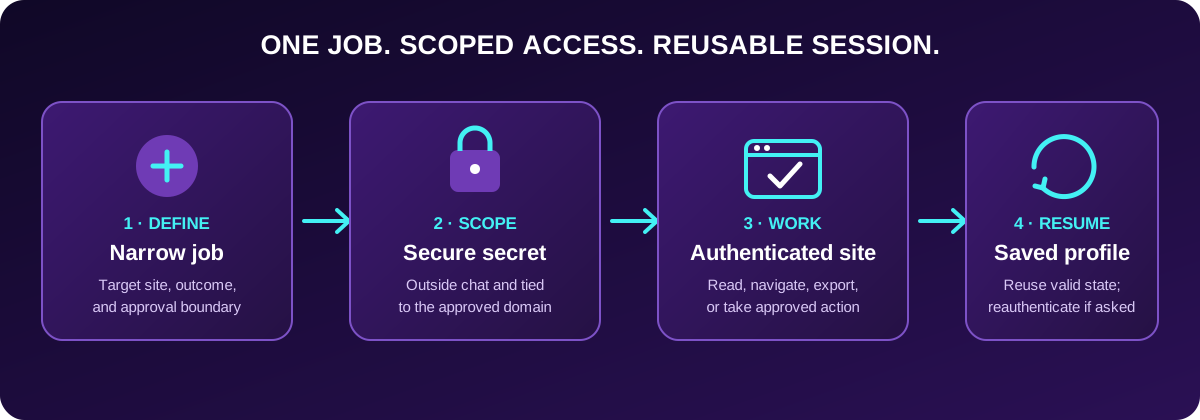
Credentials, browser state, and the agent's job remain separate controls. A valid saved session can support later work; it cannot override the website's own security rules.
Credentials and Browser State Are Different Controls
A login secret and a browser session are linked, but they are not the same.
The secret is the value used to sign in. Gobii's Secrets and Credentials guide says not to paste passwords, tokens, or API keys into chat, files, or public templates. Gobii stores a requested secret outside the chat log and encrypts its saved value at rest. It sends the secret only to the browser job for the set web domain.
The browser profile keeps site state, such as cookies and local data. Keeping that profile with one Gobii can cut down on repeat logins and help the next job pick up where the last one stopped. It does not put the raw secret in chat. It also cannot make a short site session last forever.
This split helps when access must change. You can replace a leaked password, remove a secret the Gobii no longer needs, or sign out at the site without writing a new agent charter.
The goal is simple: keep access narrow, easy to track, and easy to take back.
Think of the profile as a revocable lease, not a master key. It should be bounded, auditable, replaceable, short-lived, and finite.
Which Workflows Fit Authenticated Browser Automation?
This works best for repeat web tasks with an approved account and a result you can check.
| Workflow | What the Gobii can do | Useful boundary |
|---|---|---|
| Operations dashboards | Read status, filter records, capture a report, and sum up exceptions | Read-only until a human approves changes. |
| Supplier or client portals | Check order state, download documents, and flag missing items | Limit the account to the right customers or projects. |
| Job and talent platforms | Review allowed listings or applicant data and draft a shortlist | Require approval before outreach or status changes. |
| SaaS admin consoles | Check setup, usage, or billing details | Avoid owner accounts and bar destructive acts. |
| Forums and member databases | Search private knowledge, collect cited facts, and watch for updates | Do not post or message members without approval. |
For visual evidence and downloaded artifacts, pair authenticated sessions with Gobii Browser Intelligence. It lets browser work preserve screenshots, PDFs, exports, and other files that make the result easier to inspect.
When Should You Use a Browser Session Instead of an Integration?
Pick the cleanest tool that can do the job. A built-in app link or API is often easier to test and run at scale. Use a signed-in browser when the web page is the only path.
| Access method | Best fit | Main tradeoff |
|---|---|---|
| Connected app | A supported SaaS tool with OAuth or a managed link | Its built-in actions and resource rules set the bounds. |
| Agent API | Your software needs to create, message, schedule, check, or manage Gobiis | It runs the agent life cycle; it does not grant access to the target site. |
| Direct service API | Stable, well-defined, high-volume data or actions | You need API access and code to use it. |
| Logged-in browser session | The private website UI is the only or best route | Page changes, MFA, and session end times can halt the flow. |
Gobii's one-click AI agent integrations explains the connected-app path. Developers can use the Agent API to create, message, schedule, check, or pause a Gobii. The agent can still use its own browser and tools. These paths work together, but they solve different needs.
How Should You Scope Access and Approvals?
Treat a browser agent like a teammate with its own work account. Give it only the access its role needs. NIST calls this least privilege: a person or process gets the least access needed for the task.
In practice:
- Provision a separate service identity, never a founder, owner, or root administrator.
- Restrict its tenant, folders, queues, fields, and commands to the brief.
- Split live and test logins; use a distinct key for each environment.
- Gate outreach, form submission, deletion, permission edits, purchases, and publication.
- Pause when a new host, subdomain, or redirect needs the password.
- Retire stale secrets and audit open sessions at the provider.
Gobii's Approvals and Requests guide says to check who, what, where, and for how long before you grant access. To see how Gobii guards browsers, files, web access, and secrets at run time, read how we sandbox AI agents in production.
Some private sites allow traffic only from a known web address. A dedicated IP for Gobii agents gives you a stable address to add to that list. This proves where the traffic came from, not who signed in. The account still needs the right access.
How Do You Test a Logged-In Workflow Safely?
Start with one reversible read. In our testing, the most reliable rollouts begin with an instruction that identifies the target page, expected evidence, and the point where the Gobii must stop.
For example:
Open the Acme supplier portal, find the five orders marked delayed, and return the order number, stated reason, and current ETA. Save the export if one is available. Do not edit orders, send messages, or open any other customer account.
Then inspect the result and the Gobii timeline:
- Confirm it used the intended account and domain.
- Compare one or two returned records with the source page.
- Check any screenshot or export before expanding the task.
- Run the same read again later to learn whether the site's session persists reliably.
- Add write steps only after the read path is stable, with a preview or approval before submission.
This staged rollout separates access problems from workflow problems. If the first read fails, you can diagnose login state, account permissions, page changes, or an expired secret without wondering whether a write also changed data.
What Can Break a Saved Website Session?
The site still controls the login. Saved browser state can help the next run start faster, but it cannot skip the site's checks. We expect some runs to stop. The Gobii should ask for help instead of trying the same login again and again.
Common interruptions include:
- The session ends. The provider sets an idle timeout and a maximum lifetime.
- The password or role changes. A security reset or new role may close old visits.
- Risk-based MFA appears. Another factor may be due before a high-risk act.
- A CAPTCHA blocks the path. Some hosts ban bots or ask a person to prove they are present.
- A redesign lands. Fresh names, menus, or forms can break an old route.
- The terms forbid bots. Account access does not always grant a right to automate it.
OWASP's Session Management Cheat Sheet tells sites to end idle or old sessions, renew session IDs, ask users to sign in again after a risk event, and support logout. A safe site should stop an old session at times. Tell the Gobii to report that stop and ask for help instead of trying with no end.
Troubleshooting Logged-In Website Automation
| Symptom | Likely cause | Next check |
|---|---|---|
| The Gobii reaches the login page again | The site ended or closed the session | Check that the secret still works, then sign in through the secrets flow. |
| Login works but the page is empty | The account lacks rights, or the page loads in steps | Test the same account by hand and take a shot of the state you expect. |
| The site asks for MFA | A new session, risk flag, or high-risk act | Finish the site's check. Do not try to bypass it. |
| A button or report is gone | The site changed its page | Give the Gobii the new path or a screenshot, then rerun a read-only step. |
| It works on a laptop but not for the Gobii | A network allowlist or region rule | Check the site's rules and add a dedicated IP if it fits. |
Do not solve a login failure by pasting a password into chat. Use the agent's secrets page, confirm the domain scope, and rotate a credential if it may have been exposed.
Frequently Asked Questions
Can an AI agent log in to any website?
No. The account must be authorized, the site must permit the intended use, and its authentication flow must be compatible with browser automation. MFA, CAPTCHAs, device approval, contractual restrictions, or technical controls may require a human or rule out the workflow.
Does Gobii store my password in the chat?
No. Credentials should be entered through Gobii's secrets flow, not pasted into chat. The secret is stored outside the chat transcript, encrypted at rest, and can be scoped to the Gobii and destination that need it.
Will a Gobii stay logged in forever?
No. Gobii can save and restore its browser profile, but the target website controls session duration and can require reauthentication at any time. Build the workflow to pause and report an expired session.
Is logged-in browser automation the same as connecting an app?
No. A connected app exposes supported service actions through an integration. Logged-in browser automation operates the website interface. Prefer the integration or documented API when it covers the job; use the browser when the private UI is necessary.
Can I revoke a Gobii's website access?
Yes. Remove or replace the relevant secret in Gobii, narrow the agent's charter, and revoke active sessions or change permissions at the provider. For immediate containment, pause the Gobii while you update access.
Give the Agent a Narrow Door, Not the Whole Building
Logged-in website support turns private web interfaces into usable agent tools. The real advantage is not merely getting past a sign-in screen. It is giving one persistent worker the minimum access needed to complete a defined role, preserving valid session state between jobs, and keeping sensitive actions visible to a human.
Start with a dedicated account, one read-only task, and evidence you can verify. Once that path is reliable, expand deliberately.