
How to Run AI Agents Safely in Production
A practical guide to production AI agent safety: isolation, network egress, secrets, files, browser sessions, MCP tools, approvals, and audit trails.
A production safety guide for AI agents that use browsers, files, code, MCP tools, and real network access.
TL;DR
Running AI agents safely in production is not a prompt-engineering problem. It is a runtime architecture problem.
Once an agent can browse the web, download files, execute code, use MCP tools, or connect to internal systems, it needs the same kind of layered controls you would expect around any untrusted workload: isolation, network policy, secrets boundaries, deterministic file handling, timeouts, approvals, and audit logs.
At Gobii, we built that safety boundary around per-agent sandbox pods, gVisor isolation, proxy-only egress, deterministic filespace sync, and durable audit trails. This page explains the broader production-safety pattern first, then shows how Gobii implements it.
If you want to inspect the implementation, the OSS code is here:
https://github.com/gobii-ai/gobii-platform
We also publish the minimal sandbox compute supervisor used inside the pods:
https://github.com/gobii-ai/sandbox-compute-server
What This Guide Covers
- Why production AI agent safety is different
- Production AI agent safety checklist
- Common failure modes
- Which agent capabilities need a sandbox
- Reference architecture
- How Gobii implements the pattern
- Architecture options compared
- Who this matters for
- Tradeoffs
- Deployment questions
Why Production AI Agent Safety Is Different
Chatbots mostly produce text. Production agents touch systems.
A useful agent might log into a website, read a spreadsheet, download a PDF, run a script, call an API, send an email, trigger a webhook, or coordinate with an MCP server. Those capabilities are what make agents valuable, but they also create a much larger attack surface than a normal chat interface.
The hard part is not any single risk. The hard part is the chain:
- A webpage can contain indirect prompt injection.
- A tool can expose more authority than the task requires.
- A browser download can become untracked state.
- A credential can leak through logs, prompts, or copied files.
- An agent can retry a failing operation until it causes noise or cost.
- A long-running task can resume with stale or inconsistent state.
- Direct network egress can turn one mistake into data exfiltration.
Security here is not one feature. It is a system. An isolation boundary without network controls is incomplete. Network controls without audit logs are incomplete. File sync without deterministic conflict behavior is incomplete. Every layer has to hold.
Production AI Agent Safety Checklist
This is the minimum checklist we think serious production agent systems should satisfy.
| Safety layer | What it prevents | Gobii implementation |
|---|---|---|
| Per-agent isolation | One agent affecting another agent or the trusted app process | Separate sandbox sessions and pods for untrusted work |
| Runtime boundary | Untrusted code reaching the host kernel directly | gVisor userspace-kernel sandbox |
| Network egress control | Direct exfiltration and uncontrolled outbound access | Default-deny NetworkPolicy plus per-agent egress proxy |
| Secrets isolation | Credentials leaking into prompts, logs, or shared state | Domain-scoped credentials and trusted control-plane injection |
| Browser containment | Logged-in browser state spreading across jobs or hosts | Per-agent browser profile lifecycle |
| Filesystem boundaries | Path traversal, unbounded storage, inconsistent artifacts | Workspace normalization, size caps, deterministic filespace sync |
| Tool execution limits | Runaway commands and noisy retries | Timeouts, stdout/stderr caps, bounded tool calls |
| Human approval gates | Agents taking risky actions without review | Approval flows for sensitive operations |
| Auditability | No forensic trail after a mistake | Tool invocation logs with deterministic parameter hashes |
| Resume behavior | Long-running tasks waking up in inconsistent state | Warm, idle, snapshot, stop, and resume lifecycle |
You do not need Gobii's exact implementation to care about these layers. You do need an answer for each of them if agents are going to handle real files, credentials, browsers, or internal tools.
Common Failure Modes
These are the mistakes that make agent systems look fine in demos and brittle in production.
Treating Agent Code Like Trusted App Code
If untrusted agent actions run inside the same process as your trusted workers, a bad tool call can become an application-level incident. Browser automation, shell commands, code execution, and user-installed MCP servers should not share a trust boundary with the control plane.
Letting Sandboxes Use Direct Internet Egress
A sandbox without egress policy is only half a sandbox. If it can reach arbitrary destinations directly, prompt injection or tool misuse can still exfiltrate data. Production systems need egress to fail closed.
Copying Secrets Into the Agent Context
Credentials should not be pasted into prompts, cached in chat history, written to shared files, or logged as tool parameters. Agents need access to capabilities, not raw unrestricted secrets.
Treating Browser Downloads as Disposable
Browser agents often create the useful artifact as a side effect: a PDF, screenshot, CSV, report, or export. If those files are not captured, normalized, scanned for path safety, and synced predictably, the user cannot trust the output.
Resuming Long-Running Tasks Without State Discipline
Production agents do not only run once. They pause, resume, wait for schedules, hit limits, and wake back up. If lifecycle state is sloppy, the agent can repeat work, lose files, skip notifications, or act on stale assumptions.
Skipping Audit Logs
When an agent takes an action, you need to know what happened. The log does not need to leak secrets, but it does need to preserve enough structure for incident response: tool name, agent, timestamp, duration, exit status, and a stable hash of parameters.
Which Agent Capabilities Need a Sandbox
Not every model response needs an isolated runtime. Real-world capabilities do.
- Full browser automation for logged-in, JavaScript-heavy, dynamic websites
- File reads and writes for PDFs, CSVs, images, office documents, exports, and reports
- Code execution for data transformation and automation
- User or organization MCP servers
- Long-running tasks with durable workspace state
- Networked tools that touch external or internal systems
We do not grant these capabilities for novelty. We grant them because real work requires them, then put them behind a safety boundary by default.
For a product-level example of why browser, file, and vision capabilities need this boundary, see browser intelligence for Gobii AI agent workflows. For a broader runtime comparison, see Gobii vs OpenClaw: architecture and timeline.

def route_capability(capability: str) -> str:
    if capability in {"browser", "files", "code_exec", "mcp_server"}:
        return "sandbox"
    return "trusted"
Reference Architecture for Safe AI Agent Execution
A production agent runtime should separate trusted orchestration from untrusted execution.
The trusted control plane decides what should happen. The sandbox performs untrusted work. The egress proxy is the only path out. The filespace is the durable state layer. Audit logs describe what happened without exposing sensitive parameters.

The pattern looks like this:
- Control plane: schedules work, checks permissions, selects proxies, records audits, and syncs files.
- Sandbox runtime: executes browser, file, code, and untrusted MCP work.
- Egress proxy: mediates outbound network access.
- Filespace: stores durable artifacts and workspace state.
- Audit layer: records actions, outcomes, and parameter hashes.
This split is the foundation. The rest of the system is about making each boundary explicit.
How Gobii Implements the Pattern
Gobii's implementation is Kubernetes-native. We run untrusted agent execution in per-agent sandbox pods, request a gVisor runtime boundary, enforce proxy-only egress with NetworkPolicy, and sync artifacts back into a durable filespace.
1. Isolation Boundary: gVisor Userspace Kernel
We use a userspace kernel boundary so that no system call is passed through directly to the host kernel. In gVisor, the Sentry intercepts syscalls and the Gofer mediates filesystem access, reducing host kernel exposure. See the gVisor overview and gVisor security model.
apiVersion: v1
kind: Pod
metadata:
  name: sandbox-agent-<agent_id>
spec:
  runtimeClassName: gvisor
  serviceAccountName: sandbox-sa
  containers:
    - name: sandbox-supervisor
      image: sandbox-supervisor:latest
      securityContext:
        allowPrivilegeEscalation: false
        runAsNonRoot: true
        capabilities:
          drop: ["ALL"]
We also apply RuntimeDefault seccomp profiles to reduce syscall surface for the pod. See Kubernetes seccomp.
2. Network Egress: Policy-Enforced and Fail-Closed
Our network model is simple: sandbox pods can only talk to the per-agent egress proxy. Everything else is denied by policy. This is enforced by Kubernetes NetworkPolicy, using default-deny egress with explicit allow rules. See Kubernetes NetworkPolicy.

apiVersion: networking.k8s.io/v1
kind: NetworkPolicy
metadata:
  name: sandbox-egress-only
spec:
  podSelector:
    matchLabels:
      app: sandbox-agent
  policyTypes: [Egress]
  egress:
    - to:
        - podSelector:
            matchLabels:
              app: sandbox-egress-proxy
DNS resolution is explicitly allowed to kube-dns/coredns. Direct access to metadata endpoints and arbitrary network destinations is blocked. The proxy is the only path out.
For teams that need predictable allowlisting, the same egress model connects naturally to Dedicated IPs for stable Gobii agent access.
3. Tool Execution: Trusted Orchestration, Untrusted Runtime
When an agent calls a tool, the control plane ensures a session exists, routes the call into the sandbox, and syncs workspace changes back to filespace. The same flow is used for run_command, python_exec, file creation, browser work, and MCP tool execution.
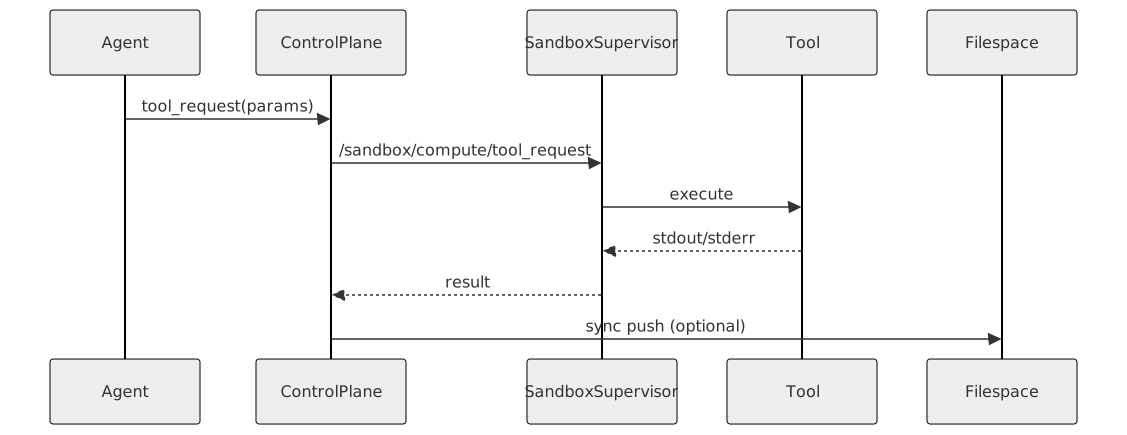
def execute_tool(agent, tool_name, params):
    session = ensure_session(agent)
    result = sandbox.tool_request(session, tool_name, params)
    if result.ok and sync_on_tool_call:
        sync_filespace_push(agent, session)
    return result
Tool execution is bounded by timeouts and stdout/stderr caps to prevent resource exhaustion. Those limits are centralized and enforced at the sandbox boundary.
4. MCP Servers: Split Trusted and Untrusted Extensions
User and organization MCP servers run inside the sandbox pod alongside sandboxed tools. Platform MCP servers remain in the trusted worker process. This separates untrusted extension behavior from the trusted core.
That split matters more as agents connect through Remote MCP access for Gobii agents and one-click integrations for Gobii AI agents.
5. Filespace Sync: Deterministic and Conflict-Safe
We treat filespace as a shared state layer with last-writer-wins conflict resolution. If the agent workspace changes after the last sync timestamp, it wins. Otherwise, filespace wins. Deletions propagate only if they are newer than the last known file version. Paths are normalized and traversal is rejected at the workspace boundary.

def push_sync(agent, session, since):
    changes = scan_workspace_changes(since)
    response = sandbox.sync(direction="push", changes=changes)
    apply_filespace_push(agent, response.changes, response.sync_timestamp)
Workspace size is hard-capped. Writes that exceed the cap fail early, so a single agent cannot consume unbounded storage.
6. Session Lifecycle: Warm, Idle, Snapshot, Resume
Production agents are long-lived, but their compute does not need to run forever. When a sandbox session goes idle, Gobii syncs workspace state, snapshots disk, and stops the pod. On resume, Gobii restores the snapshot, pulls filespace changes, and starts the supervisor again.

This is part of what lets Gobii agents behave like persistent workers rather than one-off prompt chains. For the product-level version of that idea, see always-on Gobii agents that work while you sleep.
7. Auditability and Forensic Traceability
Every tool invocation is logged with a deterministic hash of parameters. The hash preserves a durable trail without dumping sensitive values into logs.
Sandbox tool_request agent=<id> tool=<name> params_hash=<sha256> duration_ms=<n> exit_code=<n>
This gives incident response enough structure to answer: which agent acted, what tool ran, when it ran, how long it took, and whether it succeeded.
Architecture Options Compared
There is more than one way to run agents. The right architecture depends on the risk of the work.
| Approach | Good for | Main limitation |
|---|---|---|
| Local browser automation | Personal workflows, local developer control | Harder to govern, audit, and share safely across teams |
| RPA-style runners | Repetitive UI workflows with known steps | Brittle on dynamic websites and weaker on LLM-driven judgment |
| Generic containers | Simple isolated jobs | Often missing browser state, egress policy, filespace sync, and agent lifecycle |
| Cloud agent sandbox | Browser, files, code, MCP, and long-running tasks | More operational complexity |
| Gobii per-agent sandbox model | Always-on, browser-capable, auditable agent work | Requires careful runtime orchestration |
The point is not that every agent task needs the heaviest architecture. The point is that the safety boundary should match the capability. If the agent can touch browsers, files, credentials, code, or internal tools, it needs more than a chat transcript and a retry loop.
Who This Matters For
This kind of production safety matters most when agents handle real work:
- Teams with customer data or private business data
- Regulated or high-assurance environments
- Companies letting agents use logged-in websites
- Teams connecting agents to internal tools through MCP
- Workflows that create files, reports, exports, or datasets
- Operations where auditability and resume behavior matter
- Buyers comparing local-first automation with cloud-native agent runtime
For model-specific deployment risk, see Turning DeepSeek 3.2 into Real Work, Not a New Attack Surface. For architecture comparison context, see Gobii vs OpenClaw.
Tradeoffs
Sandboxing is not free.
- Syscall-heavy workloads cost more because of userspace-kernel overhead.
- Privileged workloads are intentionally incompatible.
- Some kernel features are unavailable by design.
- Snapshot, restore, and sync add lifecycle complexity.
- Policy enforcement requires more infrastructure than a simple local runner.
We accept those tradeoffs because the alternative is an unbounded attack surface. gVisor is explicit about this tradeoff profile and where it is, and is not, the right boundary. See the gVisor docs.
Questions to Ask Before Deploying AI Agents
If you are evaluating any production AI agent system, ask:
- Where does untrusted agent code run?
- Can the agent reach the internet directly?
- How are credentials injected, scoped, and kept out of logs?
- What happens to browser downloads and generated files?
- How are workspace conflicts resolved?
- Can user-installed MCP servers affect trusted workers?
- What tool calls require human approval?
- What happens when an agent pauses, resumes, or retries?
- How do you investigate an incident without exposing secrets?
- What prevents one runaway agent from consuming unbounded resources?
If the answers are vague, the system is not ready for serious agent work.
Final Take
Production AI agents are powerful because they can act on the real world. That is also why they need a real safety boundary.
The core pattern is straightforward: keep trusted orchestration separate from untrusted execution; force outbound traffic through controlled paths; keep files deterministic; scope secrets; cap tool execution; and preserve an audit trail.
Gobii's implementation is one concrete version of that pattern: per-agent sandbox pods, gVisor, NetworkPolicy-enforced egress, filespace sync, lifecycle controls, and auditability. The goal is simple: give agents real capabilities without turning every task into unmanaged risk.
If your agent needs browser, file, MCP, or code capabilities, it needs a production safety boundary.
References
- GKE sandbox pods (
runtimeClassName: gvisor):
https://cloud.google.com/kubernetes-engine/docs/how-to/sandbox-pods - gVisor overview (userspace kernel model):
https://gvisor.dev/docs/ - gVisor security model (no syscalls passed through directly):
https://gvisor.dev/docs/architecture_guide/security/ - Kubernetes RuntimeClass (per-pod runtime selection): https://kubernetes.io/docs/concepts/containers/runtime-class
- Kubernetes NetworkPolicy (default-deny egress model): https://kubernetes.io/docs/concepts/services-networking/network-policies/
- Kubernetes seccomp (RuntimeDefault profiles):
https://kubernetes.io/docs/reference/node/seccomp/ - OWASP Top 10 for LLM Applications (prompt injection, excessive agency, plugin risks):
https://owasp.org/www-project-top-10-for-large-language-model-applications/ - MITRE ATLAS / Generative AI security risks: https://www.mitre.org/news-insights/news-release/mitre-and-microsoft-collaborate-address-generative-ai-security-risks
- Minimal sandbox compute server (pod supervisor): https://github.com/gobii-ai/sandbox-compute-server