
Review Before Send keeps you in control of agent email
Review Before Send holds external AI agent email in Gobii's Outbox so you can inspect recipients, edit the message, approve it, or discard it before delivery.
Giving an AI agent more responsibility doesn't have to mean giving up control all at once.
Several Gobii customers asked for the same thing: let my agent handle the work, but give me one last look at the email before it goes out. Review Before Send adds that human checkpoint. An external email can wait in Outbox until an authorized person reviews the exact message and decides what happens next.
Review Before Send is available on Gobii Pro and Scale today.
Key Takeaways
- Inspect recipients, subject, message, and attachments before an external email leaves Gobii.
- Approve and send the exact version, edit it first, or discard it.
- Review from the agent's chat or open Outbox for the complete preview.
- Choose review for every external email, only first messages to new contacts, or automatic sending.
How Does Review Before Send Work?
Review Before Send places a human decision between preparation and delivery. When an agent drafts an external email covered by its policy, Gobii saves the message in Outbox instead of sending it immediately. No recipient receives that draft while it is waiting for review.
Outbox shows the sender, every To, CC, and BCC recipient, the subject, message body, and attachments. You are reviewing the actual saved version, not a summary of what the agent intends to send.
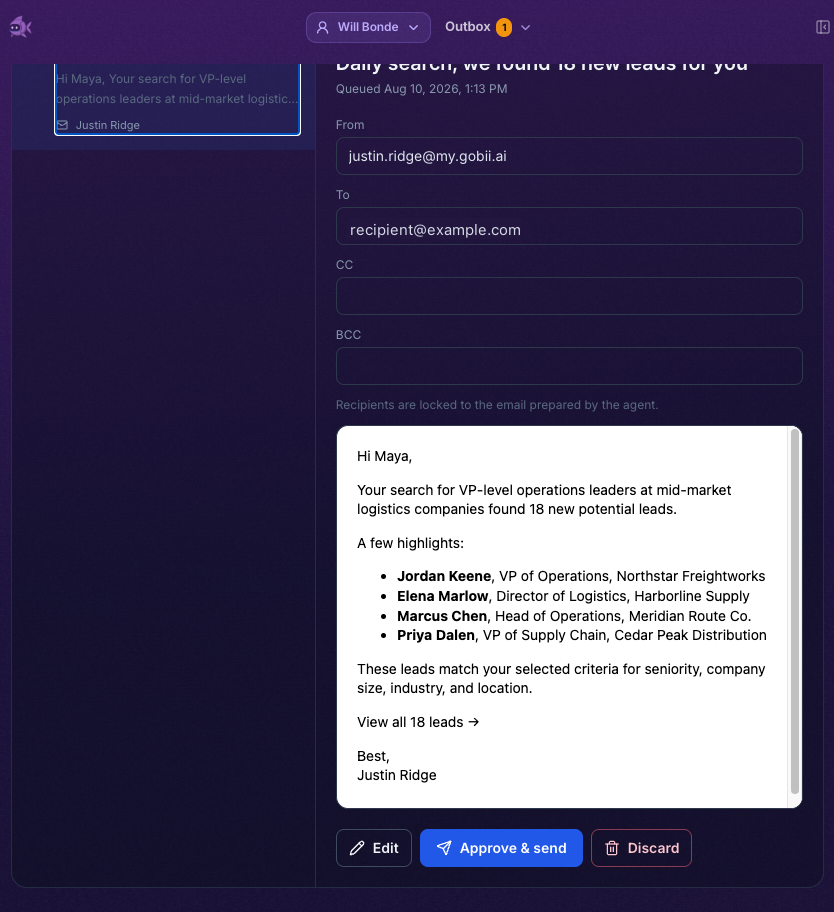
This boundary is simple by design. The agent still researches, drafts, and assembles the email. A person checks the details that carry real-world consequences, then makes the final call.
What Can You Do With a Pending Email?
Every pending email gives you three choices: approve and send it, make changes first, or discard it. Approval queues the exact saved version for delivery. Discard closes the review without contacting the recipient.
Select Edit when the subject, body, or attachments need work. Saving those changes creates a new review version, so you can inspect the updated preview before approving it. To, CC, and BCC recipients stay locked. If a recipient is wrong, discard the email and ask the agent to prepare a new one.
Locking recipients keeps a consequential change visible. A revised sentence can be reviewed as copy, while a different recipient starts a new send decision with a clear record of who will receive it.
Can You Review From Chat or Outbox?
Yes. If you're already chatting with the agent, the pending approval appears in its timeline. You can approve the message there, deny it, or open the full Outbox view.
Outbox brings pending reviews from the current workspace into one place. It provides the complete email preview and keeps later states understandable: messages that need review, approved messages entering delivery, failed sends, and recent outcomes.
The agent's timeline records review activity alongside the work that produced the draft. That makes the approval part of the task history instead of a decision that happens in a separate, disconnected system.
For the full review flow, warning badges, expiry behavior, and delivery states, see the Review Before Send documentation.
How Do You Choose the Right Email Autonomy Level?
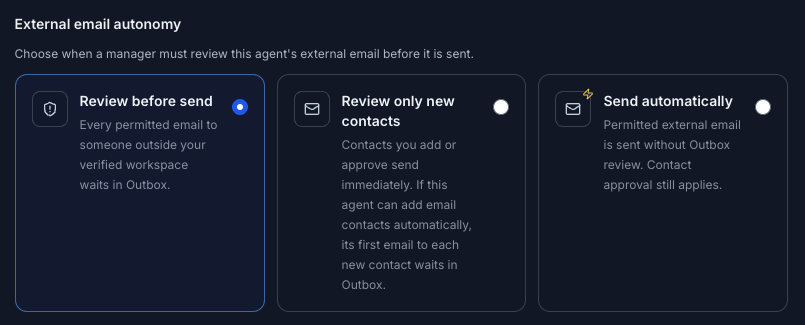
Gobii gives each agent three external email policies. You can start with hands-on review, then loosen the control after the recipients, instructions, and output have earned your confidence.
- Review before send: Every permitted email with an external recipient waits in Outbox.
- Review only new contacts: Email to known, permitted contacts can send immediately. When an agent is allowed to add email contacts automatically, its first email to each new contact waits for review.
- Send automatically: Permitted external email sends without Outbox review.
Set the default for new agents from Outbox. You can also configure an individual agent when one workflow needs a stricter or more permissive boundary than the rest of the workspace.
The safest starting point is Review before send for a new agent or a consequential workflow. Move toward selective review or automatic sending only after you are comfortable with the agent's recipients, content, and standing instructions.
Does Email Approval Replace Contact Access?
No. Review Before Send controls what gets sent; contact access controls who an agent may contact. Approving an Outbox email does not silently authorize a new or blocked recipient.
Each external recipient must already have outbound contact access, or the agent must be configured to add email contacts automatically. Keeping these decisions separate prevents one message approval from turning into broader permission for future outreach.
See Contact Access and Allowlists for the recipient permission model, and Approvals and Requests for other actions that may need a person to step in.
Why Does This Make Agent Email Easier to Trust?
Trust grows through observable experience. Review Before Send lets an agent do the preparation while preserving a clear checkpoint before its work reaches someone outside your workspace.
That checkpoint is useful for a new workflow, sensitive communication, or any task where timing and wording matter. You can see the complete message, correct it without starting over, and retain a record of the decision in the same product where the work happened.
The feature extends the same principle behind visible agent work and agent feedback memory: autonomy works better when people can inspect important activity and refine how the agent operates.
Frequently Asked Questions
What is Review Before Send?
Review Before Send is a human approval checkpoint for external email prepared by a Gobii agent. The exact message waits in Outbox until an authorized person approves, edits, or discards it.
What can I inspect before an agent email is sent?
You can inspect the sender, To, CC, and BCC recipients, subject, body, and attachments. Outbox shows the exact saved version that will be queued for delivery after approval.
Can I edit an email in Outbox?
Yes. Edit the subject, body, or attachments, save a new review version, and inspect it before approval. Recipient fields stay locked. If a recipient is wrong, discard the draft and ask the agent to prepare a new email.
Can I choose which agent emails need review?
Yes. Choose review for every external email, only first messages to new contacts, or automatic sending for permitted recipients. Contact access rules still apply under every policy.
Sources
- Review Before Send, Gobii product documentation. Retrieved August 11, 2026.
- Contact Access and Allowlists, Gobii product documentation. Retrieved August 11, 2026.
- Approvals and Requests, Gobii product documentation. Retrieved August 11, 2026.
About the Author
Will Bonde works across Growth & Engineering at Gobii, where he helps shape the platform and how its browser-native agents serve customers. Meet Will and the rest of the Gobii team.