
AI Agent Planning: How Plan-and-Execute Workflows Work
Learn how AI agent planning breaks complex work into visible steps, when agents should replan, and why 80% of WebArena tasks can use plan-then-execute.
AI agent planning turns a complex request into visible, checkable work. The agent identifies the goal, orders the major steps, chooses tools, tracks progress, and revises the route when new evidence changes what should happen next. That planning layer makes long-running AI agent workflows easier to understand and steer.
The need is growing with adoption. Anthropic's survey of more than 500 technical leaders found that 57% of organizations were already using agents for multi-stage workflows, including 16% running cross-functional processes. Another 81% planned to tackle more complex use cases in 2026 (The 2026 State of AI Agents Report, 2026).
A visible plan does not make an agent infallible. It gives users and evaluators an earlier place to catch a wrong assumption, missing input, risky tool call, or vague deliverable before the agent spends more time moving in the wrong direction.
Key Takeaways
- Plans make goals, steps, tools, and review points inspectable.
- Use upfront planning for predictable work and replanning for changing environments.
- Review scope and irreversible actions before execution.
- Research found 80% of WebArena tasks could use a programmatic plan.
Try visible agent planning in Gobii
In this guide
- Definition and core parts
- The plan-and-execute loop
- Where planning helps
- When to revise a plan
- Human review checklist
- Visible plans in Gobii
- Practical examples
- Planning evaluation
- Frequently asked questions
What Is AI Agent Planning?
AI agent planning is the process of choosing and ordering actions that move an agent from a user goal to a verifiable result. A 2026 planning benchmark tests this capability with 4,209 multimodal cases across 22 domains and five settings, rather than treating planning as an invisible part of execution (Agent Planning Benchmark, 2026).
A useful agent plan answers seven questions:
- What outcome is the user asking for?
- Which inputs and constraints already exist?
- What intermediate results must be produced?
- Which tools may the agent use?
- What can happen automatically, and what needs approval?
- How will the agent know a step succeeded?
- When should it stop, retry, or ask for help?
Planning is not the same as exposing hidden model reasoning. The valuable artifact is an operational plan: a concise list of intended actions, dependencies, checks, and deliverables that a user can understand. It should show what the system will do without dumping private reasoning traces or filling the interface with speculative detail.
| System | Path | Best fit | Main limitation |
|---|---|---|---|
| Fixed automation | Defined entirely in code | Stable rules and structured inputs | Breaks when exceptions fall outside the path |
| Full-plan agent | Generates the route before acting | Predictable multi-step work | Early assumptions can become stale |
| Stepwise agent | Chooses the next step from fresh evidence | Changing or partially observable environments | Harder to preview the whole run |
| Hybrid agent | Sets phases first and revises affected steps | Most practical business workflows | Needs explicit replanning rules |
A plan is more than a progress indicator. It is a control surface before execution, a shared status record during execution, and an evaluation artifact after the work ends. Those three roles explain why visible plans help both users and engineering teams.
How Does Plan-and-Execute Work?
A plan-and-execute agent separates deciding from doing, then reconnects them through feedback. A 2026 analysis of the WebArena benchmark found that every task was compatible with plan-then-execute and 80% could use a purely programmatic plan without a runtime LLM subroutine (Web Agents Should Adopt the Plan-Then-Execute Paradigm, 2026).
The practical loop has six parts:
- Clarify the goal. Convert the request into a concrete result. "Research competitors" is loose; "deliver a sourced comparison of five competitors by Friday" is testable.
- Set boundaries. Name approved sources, tools, accounts, budgets, deadlines, and actions that require a person.
- Decompose the work. Break the goal into steps with dependencies. Research should come before synthesis; validation should come before delivery.
- Execute one step at a time. Each tool result becomes evidence for the next decision. Persistent agent memory can carry durable instructions and prior work across longer runs.
- Check the result. Compare the output with the step's success condition. A file existing is not enough if its rows are incomplete or its sources are missing.
- Continue, revise, or stop. Update only the affected portion of the plan, or return control to the user when the route is no longer safe or useful.
The planner does not need access to every possible tool. In fact, smaller approved toolsets reduce ambiguity. Use scoped app integrations for the systems the task actually needs, then state what each connection may read or change.
When Does Agent Planning Help?
Planning helps when a task has dependencies, multiple tools, meaningful cost, or a deliverable that benefits from review. Google Research tested 180 agent configurations and found architecture mattered sharply: centralized coordination improved a parallel finance task by 80.9%, while multi-agent variants degraded sequential PlanCraft performance by 39% to 70% (Towards a Science of Scaling Agent Systems, 2026).
That result argues against adding planners, workers, and reviewers by habit. Start with the structure of the work. A single agent with a short plan can be better than a team of agents when every step depends on the one before it. Parallel workers earn their overhead when subtasks can proceed independently and a central planner can validate the combined result.
Good planning candidates share four traits: the outcome is concrete, dependencies are visible, intermediate work can be checked, and a failed step has a safe fallback. A fast one-shot lookup does not need a plan. Neither does deterministic work that a simple script can complete more cheaply and reliably.
When Should an AI Agent Replan?
An agent should replan when new evidence invalidates an assumption, not merely because execution is taking time. In a 2026 study of 794 human-labeled WebArena trajectories, full-plan execution completed 36.29% of tasks versus 38.41% for a stepwise baseline, showing that rigid upfront plans can lose ground in changing interfaces (AI Planning Framework for LLM-Based Web Agents, 2026).
The same study found a larger gap in step alignment: 58% for the full-plan agent versus 82% for the stepwise baseline. The lesson is not to avoid planning. It is to keep the objective stable while letting the route absorb real feedback.
Useful replanning triggers include:
- A required source, page, file, or record is unavailable.
- A tool returns empty, conflicting, or malformed data.
- The next action would exceed the agreed budget or scope.
- The user supplies a correction that changes a dependency.
- A planned write becomes irreversible or higher risk than expected.
- The evidence already satisfies the goal, making later steps unnecessary.
Replanning also needs limits. Preserve completed work, record why the route changed, update the smallest useful set of steps, and cap retries. If the same blocker survives repeated attempts, the plan should stop and ask for input instead of hiding the failure behind more activity.
What Should Humans Review in an Agent Plan?
Human review should concentrate on decisions that are difficult to reverse or expensive to get wrong. OpenAI's agent guide names two common intervention triggers: exceeding failure thresholds and approaching high-risk actions such as payments, large refunds, or order cancellation (A Practical Guide to Building Agents, 2025).
Review the plan before execution when it touches external communication, credentials, personal data, money, account permissions, destructive changes, or public publishing. The plan should say who approves the action and what evidence that person will see.
| Review area | Check before running |
|---|---|
| Goal | Is the requested outcome unambiguous? |
| Inputs | Are the right files, sites, and records named? |
| Permissions | Does each tool have the narrowest useful access? |
| External actions | Could the step affect another person or system? |
| Deliverable | Can someone judge completion? |
| Stop condition | What makes the agent pause? |
Write the answers as direct constraints: "Produce a draft for review," "Use only the uploaded CSV," "Read the CRM but do not edit contacts," and "Stop after two failed login attempts." Clear plan language is easier for both the agent and reviewer to apply.
NIST's AI Risk Management Framework organizes risk work into four functions: Govern, Map, Measure, and Manage (NIST AI RMF Core, 2023). An agent plan can make those functions concrete by naming ownership, context, checks, and responses before work begins. For higher-risk deployments, pair planning with sandboxing and production guardrails.
How Gobii Makes Agent Plans Visible
Transparency is one of Anthropic's three stated principles for effective agents, alongside simple design and careful tool interfaces. Its guidance specifically recommends showing an agent's planning steps and giving agents checkpoints for human feedback during longer tasks (Building Effective Agents, 2024).
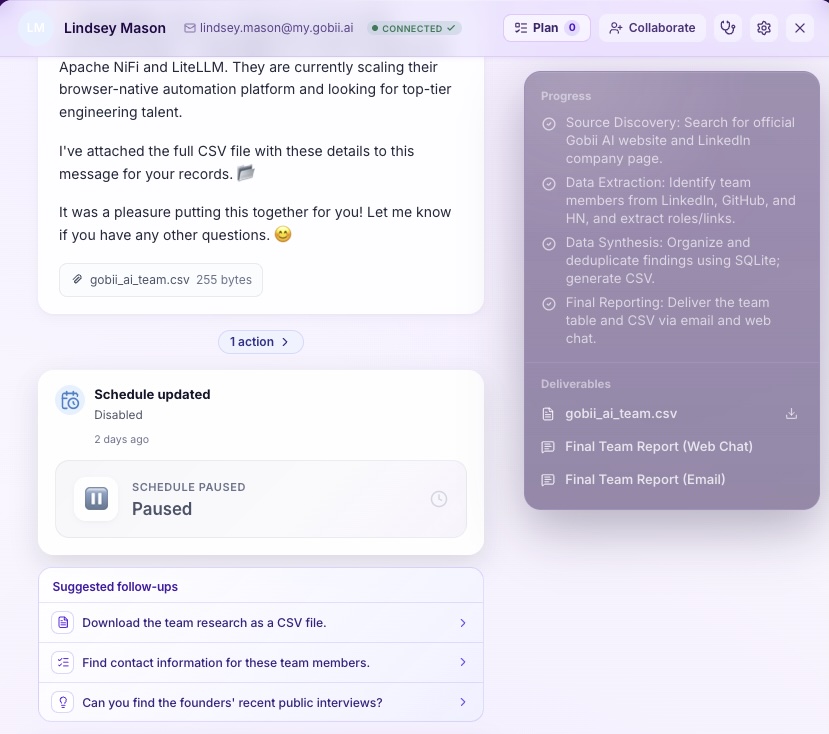
Gobii shows a plan for larger work that involves research, files, connected tools, approvals, or substantial deliverables. Small questions may not need one. During a planned run, the progress panel keeps completed, active, and upcoming steps beside the conversation, while finished files and messages remain attached as deliverables.
You steer the plan in plain language. Ask the agent to make the job one-time instead of recurring, use only approved sources, change the output format, finish the first two steps and wait, or avoid an app connection. If the plan is wrong, correct it early. The detailed Planning and Deliverables documentation includes a practical review checklist.
When we built visible planning into the product, the goal was not to make every task look bigger. It was to give complex work a shared shape. A short request can stay short. A long run should tell you where it is going, what it has finished, and where your judgment matters.
Try First-Class Agent Planning
AI Agent Planning Examples
Planning becomes most valuable when the steps depend on one another and the output has a named reviewer. Anthropic found 57% of surveyed organizations already used agents for multi-stage workflows, and 56% planned research and reporting agents during the following year (The 2026 State of AI Agents Report, 2026).
Research report
An agent can plan source discovery, evidence extraction, comparison, fact checking, drafting, and delivery. The reviewer should see the source list before synthesis begins. Replan when sources conflict, when a required primary source is unavailable, or when the initial scope produces too much material for the requested format.
Spreadsheet cleanup
The plan can inspect headers, profile data quality, propose normalization rules, preview changed rows, and wait before writing. For important sheets, separate read and write steps. The Google Sheets automation guide explains how to narrow access and verify writes.
Candidate sourcing
Start by defining the role, evidence standard, geography, exclusions, and output columns. Then plan source research, qualification, deduplication, and shortlist review. A replan is warranted when the market is much smaller than expected or a criterion eliminates nearly every candidate. Do not quietly weaken the requirement.
Authenticated portal update
The agent can plan login, navigation, data collection, draft changes, approval, and final submission. Credentials and saved browser state need separate controls. Review the exact fields before any write, and use the logged-in website automation checklist for session and approval boundaries.
Event-driven operations
An inbound webhook can wake an agent when a form, CRM record, or monitoring system changes. The plan should validate the payload, retrieve missing context, apply the correct procedure, prepare the result, and escalate malformed or high-risk events. The trigger starts the work; it should not erase the review rules.
The strongest plans describe evidence transitions, not just activity. "Research, analyze, report" sounds organized but says little. "Collect five primary sources, extract dated claims, resolve conflicts, and produce a comparison table" gives every step an observable handoff.
How Do You Evaluate an Agent Plan?
Evaluate planning separately from final output so you can tell whether a failure came from the route or the execution. The 2026 Agent Planning Benchmark spans 4,209 cases, 12 multimodal models, and an E1-E6 error taxonomy designed to diagnose long-horizon, tool-noise, feasibility, and refinement failures (Agent Planning Benchmark, 2026).
Use a small scorecard for production workflows:
| Metric | What it reveals | Example measure |
|---|---|---|
| Plan correctness | Whether the route can reach the goal | Reviewer acceptance before execution |
| Step validity | Whether each action is feasible and permitted | Invalid or blocked steps per run |
| Tool selection | Whether the plan chose the right capability | Unnecessary or missing tool calls |
| Evidence coverage | Whether inputs support the result | Required sources or fields present |
| Recovery | Whether feedback produces a better route | Successful replans after a failed step |
| Efficiency | Whether the route avoids waste | Accepted result per tool call or credit |
| Escalation quality | Whether the agent asks at the right time | Useful versus avoidable human requests |
| Final quality | Whether the deliverable meets the brief | Human acceptance and correction rate |
Anthropic describes one production evaluation in three plain dimensions: do not break things, do what the user asked, and do it well. Another team built an agent evaluation system in three months using static analysis, browser agents, and LLM judges (Demystifying Evals for AI Agents, 2026).
Start with a small set of real tasks and known edge cases. Save the initial plan, plan updates, tool results, final deliverable, and reviewer correction. That trace lets you compare versions and identify recurring failures instead of grading only the polished ending.
Frequently Asked Questions
Planning has several valid architectures rather than one universal pattern. A 2026 benchmark therefore evaluates five settings across 22 domains, including holistic plans, feedback-conditioned steps, extra tools, broken tools, impossible tasks, recovery behavior, and calibrated refusal (Agent Planning Benchmark, 2026).
What is AI agent planning?
AI agent planning converts a goal into ordered actions with dependencies, tools, checks, and stop conditions. The plan can be created before execution or updated as evidence arrives. Good plans are concise enough to inspect and specific enough to show what success, failure, approval, and delivery look like.
What is the difference between an agent plan and a fixed workflow?
A fixed workflow follows routes chosen in advance by its designer. An agent plan is generated for the current goal and can change within approved boundaries. In practice, many reliable systems combine both: code enforces permissions and irreversible-action rules, while the agent adapts research, analysis, and recovery steps.
Should an AI agent plan everything before it starts?
No. A 2026 WebArena study found a full-plan agent completed 36.29% of tasks versus 38.41% for a stepwise baseline. Use full plans when tools and environments are predictable. Use stepwise or hybrid planning when new pages, files, tool results, or human decisions will change later actions.
Can you change a Gobii agent's plan while it works?
Yes. Redirect the plan in plain language: narrow the goal, change the deliverable, restrict sources, remove a tool, or ask the agent to stop after selected steps. For external communication and sensitive writes, state that the agent must wait for approval before the action rather than relying on a final review.
Put the Plan Before the Spend
Agent planning will matter more as workflows grow. Anthropic found 81% of surveyed organizations planned more complex agent use cases in 2026, including 39% building multi-step processes and 29% pursuing cross-functional projects. Visible plans give those larger runs an earlier, cheaper review point (The 2026 State of AI Agents Report, 2026).
Start with one bounded workflow. Define the outcome, approved inputs, tools, review points, deliverable, and stop conditions. Let the agent revise the route when evidence changes, but keep the goal and risk boundaries stable. Then evaluate the plan as carefully as the final result.