
AI Email Assistant: Keep Context Across Every Reply
Learn how an AI email assistant keeps context across every reply, using 3 standard email headers to support safer, longer-running agent conversations.
An AI email assistant becomes far more useful when it treats each reply as the next step in the same job. Drafting one polished message is easy. Keeping the participants, decisions, attachments, open questions, and approval boundaries connected across a long conversation is the harder problem. Gobii's threaded agent conversations handle that continuity automatically, so people don't have to reconstruct the history every time someone presses Reply.
In a July 20, 2026 U.S. query, the DataForSEO Labs Google Keyword Overview reported 2,400 monthly searches and keyword difficulty 21 for "AI email assistant." The related "AI email agent" query measured 140 monthly searches at difficulty 9. Both carried commercial intent. That demand spans several products, from writing aids to agents that can keep working after a reply arrives.
Key takeaways
- Thread continuity depends on message identity, not a matching subject line alone.
- Gobii carries the parent and reference chain automatically when an agent replies in an existing conversation.
- Thread context and persistent memory solve different problems, and a capable email agent needs both.
- High-consequence replies still need explicit human review.
Keep an email workflow moving with Gobii
In this guide
- AI email assistants explained
- Why thread context matters
- How Gobii preserves a reply chain
- What context should survive
- Workflows that need threading
- A practical prompt blueprint
- Human review and safety
- An evaluation scorecard
- Frequently asked questions
Keyword research method
We queried DataForSEO Labs Google Keyword Overview on July 20, 2026 with location_name: United States, language_code: en, and clickstream normalization disabled. DataForSEO last updated the cited keyword records on July 14 and July 13, 2026. Search volumes are rounded estimates, not traffic forecasts.
The current market often stops at drafting, summarizing, or sorting. The video below is useful for seeing that landscape. Watch for the dividing line between an inbox helper that prepares text and an agent that owns the next step of a continuing conversation.
What Is an AI Email Assistant?
An AI email assistant is software that helps interpret, organize, draft, or act on email. The problem is large enough to justify more than faster writing. In 2025, Microsoft measured more than 100 emails and 153 Teams messages per employee per weekday, with a meeting, email, or chat interruption every two minutes (Microsoft WorkLab, Breaking down the infinite workday, retrieved July 20, 2026).
The label covers three increasingly capable categories:
| Category | Typical behavior | When work continues |
|---|---|---|
| AI email writer | Rewrites, shortens, translates, or drafts text | A person copies or sends the draft |
| Inbox assistant | Summarizes threads, ranks messages, suggests replies, extracts tasks | A person stays inside the mail client |
| AI email agent | Reads a message, uses tools, creates deliverables, sends or drafts replies, and resumes when the recipient responds | The workflow can continue across time and systems |
That last category changes the design problem. The assistant is no longer helping with a sentence. It is participating in a stateful exchange. The right question becomes: can the agent tell which conversation this reply belongs to, what changed since its previous message, and whether it has permission to act?
For an agent that works beyond the inbox, persistent AI agent workflows provide the larger pattern: trigger, context, action, check, and delivery. Email can be the trigger and delivery channel without being the entire job.
Why Does Email Thread Context Matter?
Email thread context preserves the relationship between a new reply and the messages that explain it. Google's current Gmail API guide lists three conditions for adding a reply to a thread: the target threadId, compliant References and In-Reply-To headers, and a matching subject (Google for Developers, Manage threads, retrieved July 20, 2026).
Visible subject text is only one clue. Two unrelated conversations can share the same subject. A participant can edit the subject midstream. A forwarded message may quote an older exchange without actually continuing it. Reliable systems use message identifiers and provider thread metadata to connect the reply to its parent.
Even a perfectly assembled transcript doesn't guarantee that a model will use every detail correctly. The 2024 Lost in the Middle study evaluated multi-document question answering with 10, 20, and 30 documents. It found a U-shaped pattern: models used relevant information more reliably at the beginning or end than in the middle, and GPT-3.5-Turbo dropped by more than 20% in some settings (Liu et al., Lost in the Middle, retrieved July 20, 2026).
Threading and reasoning are separate guarantees. Threading answers, "Which messages belong together?" Reasoning answers, "Which facts in those messages matter now?" Good automation needs both. The agent should receive the correct chain, then actively surface decisions, conflicts, deadlines, and unanswered questions instead of treating the transcript as a flat block of text.
How Does Gobii Keep an AI Email Assistant in the Same Thread?
Gobii replies with the three identity fields that modern email clients use to reconstruct a conversation: Message-ID, In-Reply-To, and References. RFC 5322 says each message should have a unique Message-ID, a reply should identify its parent through In-Reply-To, and References can identify the wider conversation thread (RFC Editor, RFC 5322 section 3.6.4, retrieved July 20, 2026).
Under the hood, a threaded reply follows a defensive sequence:
- Resolve the parent. The agent's reply targets the specific Gobii message it is answering. People don't need to copy an RFC identifier or edit a mail header.
- Validate the route. The target must be an email message, and its contact address must match the intended recipient. A stale message from another channel or person is rejected as a reply target.
- Preserve identity. Gobii reads the parent's RFC
Message-IDand creates a unique identifier for the outbound reply if one does not already exist. - Build the reply chain. The parent identifier becomes
In-Reply-To. ExistingReferencesvalues are kept, deduplicated, and extended with the parent. - Send and retain. The reply headers travel through the configured email transport, and the same metadata remains attached to the agent message for the next response.
Google documents a similar contract for messages inserted into an existing Gmail thread: applications provide the target threadId, set compliant References and In-Reply-To headers, and keep the subject aligned. Microsoft Graph exposes both conversationId and conversationIndex on a message (Google for Developers, Manage threads, 2026; Microsoft Learn, message resource, retrieved July 20, 2026).
In our experience implementing this in Gobii, the header construction was the easy part. The important guardrail was making the reply target explicit inside the agent's own message history. A fluent response sent to the wrong thread is still wrong. We therefore bind the parent to an internal message, verify that it belongs to email and the same contact, then derive the standards-based headers from that validated parent.
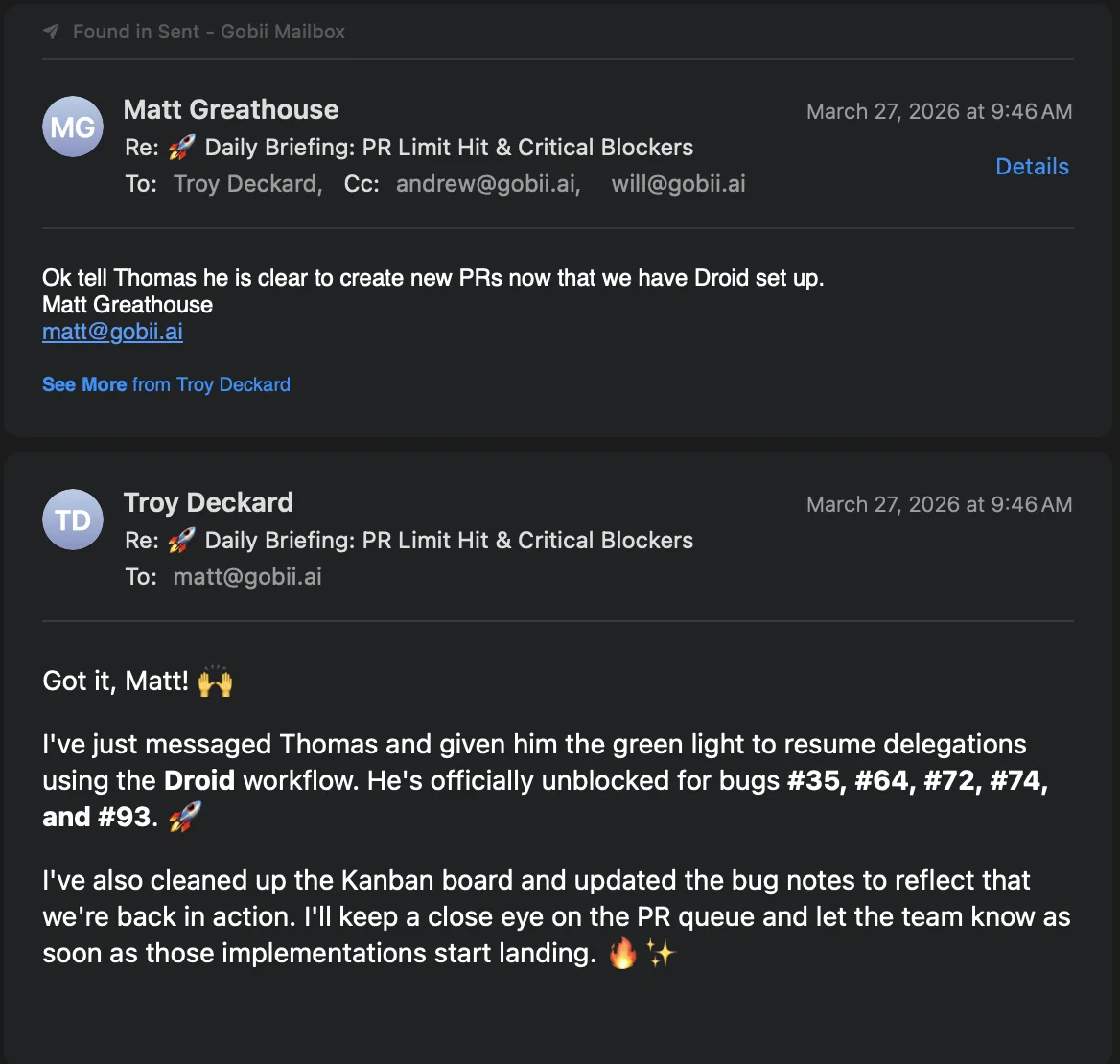
The same continuity principle appears in persistent agent memory, but the boundary is different. Memory carries durable behavior across work. A thread carries the local state of one conversation.
What Should an AI Email Assistant Preserve?
A useful AI email assistant preserves decisions and open loops, not just message text. In 2024, Microsoft reported that 85% of emails were read in under 15 seconds and that the typical person read roughly four emails for every one sent (Microsoft WorkLab, AI at Work Is Here, retrieved July 20, 2026). Scannable state matters when attention is scarce.
| Context element | Example | Failure when lost | Useful agent behavior |
|---|---|---|---|
| Participants and roles | Buyer, account owner, legal reviewer | Replies go to the wrong person or expose information | Preserve To and Cc intent; flag unfamiliar recipients |
| Decisions | "Use the annual plan" | The agent reopens a settled choice | Restate the decision only when a new message conflicts |
| Open questions | "Can delivery move to Friday?" | A polished reply ignores the actual request | Track unanswered questions and close them explicitly |
| Commitments | "I'll send the revised file tomorrow" | Deadlines pass without action | Create or update the task, then report completion in thread |
| Attachments and versions | proposal-v4.pdf replaces proposal-v3.pdf |
Work uses a stale source | Name the current file and isolate obsolete versions |
| Approval boundary | Manager must approve price changes | The agent creates an unauthorized commitment | Draft the change and wait for approval before sending |
| Tone and relationship | Existing customer reporting an outage | Reply sounds like cold outreach | Match the relationship and urgency without inventing empathy |
Thread context also needs a freshness rule. A message from yesterday can supersede a decision from last week. An attachment in the newest reply can replace an earlier file. An agent should not average conflicting facts together. It should identify the latest authoritative update, show the conflict, and ask when authority is unclear.
If files move with the conversation, AI document automation explains how to define the input, transformation, checks, and reviewable output. The email thread should carry the handoff, while the workspace keeps the actual source and finished artifact stable.
Eight AI Email Workflows That Need Thread Context
Thread context matters most when work lasts longer than one exchange. In 2025, 40% of Microsoft 365 users who were online at 6 a.m. were already reviewing email, and the average employee received more than 100 emails per day (Microsoft 365 Blog, Copilot and agents tackle the infinite workday, retrieved July 20, 2026). Continuity helps keep routine follow-up from becoming manual archaeology.
- Sales qualification. Firmographics arrive first; a technical evaluator joins later. Gobii refreshes the account brief, recognizes the new role, and asks only what discovery still lacks.
- Candidate coordination. Three proposed interview slots become two after the recruiter responds, then one after the panel confirms. Scheduling state changes; the hiring judgment stays with people.
- Vendor negotiation. Midway through procurement, a supplier revises freight charges and lead time. A comparison against the original quotation exposes both deltas before acceptance.
- Customer support. Fresh logs turn an ambiguous outage report into a reproducible defect. Updating the incident chronology prevents another request for symptoms the customer already supplied.
- Approval loops. Editorial comments move from author to reviewer to final approver. Requested edits remain auditable, resolved notes are marked, and release pauses at the named sign-off.
- Recurring research. A scheduled brief prompts a narrow follow-up about one competitor. The resulting investigation stays beside the original evidence, preserving provenance for the stakeholder.
- Project coordination. Owners report against one milestone at different times. A consolidated digest separates completions, dependencies, and blockers without smoothing away disagreement.
- Document collection. Two of four requested files arrive on Monday; the remainder follow Thursday. Checklist reconciliation prevents duplicate reminders and identifies the authoritative version.
The durable unit is the open loop, not the email. One thread may contain several open loops, and one message may close only one of them. An assistant that merely summarizes the latest reply can still miss the job. Track each question, commitment, artifact, and approval as separate state, then use the thread as the evidence trail.
For work that should start from a system event instead of a person replying, inbound webhooks provide a cleaner trigger. When email is the natural human interface, threading keeps that automation legible to everyone involved.
How Should You Prompt a Threaded AI Email Assistant?
A strong email-agent prompt defines six things: role, thread goal, allowed actions, approval rules, output format, and stop condition. NIST AI RMF Map 2.1 calls for organizations to define the specific tasks and methods an AI system will support, while Map 2.2 asks them to document its knowledge limits and human oversight (NIST, AI RMF Core, retrieved July 20, 2026).
Use this blueprint:
You manage the existing email thread with [people or role].

Goal:
- [What outcome closes the thread]

Carry forward:
- Confirmed decisions: [list]
- Open questions: [list]
- Current files or records: [paths or names]
- Deadlines and owners: [list]

You may:
- [Research, create a file, update a record, draft a reply]

Get approval before:
- [Sending, changing price, adding a recipient, making a commitment]

For every new reply:
1. State what changed.
2. Update the open-question and commitment list.
3. Use the newest authoritative file or fact.
4. Reply in the same thread unless the topic is materially new.
5. Stop and ask if participants, authority, or intent are unclear.
Prompting cannot repair a bad boundary. Keep one major job per conversation. A switch from contract review to a support incident warrants a new thread. Added participants trigger a disclosure check; forwarded history supplies evidence, not automatic permission to act.
An automatically learned agent skill can preserve a repeatable email method after the pattern proves useful. Current people, facts, and exceptions still come from the active conversation.
Where Should Humans Review Automated Email Replies?
Humans should review any email that can move money, create an obligation, disclose sensitive information, or materially affect a person. The FBI's 2025 IC3 report recorded 24,768 Business Email Compromise complaints and $3.047 billion in reported losses (FBI, 2025 IC3 Annual Report, retrieved July 20, 2026). Thread continuity does not authenticate the sender or make a request safe.
That distinction is easy to miss. In-Reply-To and References say where a message belongs. They do not prove that every participant is trustworthy, that an account has not been compromised, or that a payment instruction is legitimate. A familiar thread can increase confidence at exactly the moment a reviewer should slow down.
Use consequences to set autonomy:
| Reply type | Suggested handling | Required check |
|---|---|---|
| Receipt acknowledgment | Automatic within known rules | Correct sender, thread, and attachment count |
| Routine status update | Automatic or sampled review | Facts match the system of record |
| Research delivery | Draft or automatic for approved recipients | Sources, dates, confidentiality, attachment version |
| New recipient or changed Cc list | Human review | Disclosure scope and recipient identity |
| Pricing, contract, or policy commitment | Human approval | Authorized owner and exact terms |
| Banking, payment, credential, or access change | Out-of-band verification | Verify through a known second channel |
| Hiring, disciplinary, legal, or medical communication | Human decision and approval | Accuracy, fairness, policy, and qualified owner |
NIST Govern 3.2 recommends policies that differentiate roles and responsibilities for human-AI configurations, and Map 3.5 calls for defined, assessed human-oversight processes (NIST, AI RMF Core, 2023; retrieved July 20, 2026). In email, that means naming who can approve what before the first automated reply is sent.
Scoped one-click integrations can limit the records an agent reaches after reading an email. The email policy must also limit who can trigger actions and which results may leave the workspace.
How Do You Evaluate an AI Email Assistant?
Evaluate an AI email assistant with conversation tests, not isolated draft quality. Google's thread guide requires a target threadId, standards-compliant reply headers, and a matching subject when adding a message to a Gmail thread (Google for Developers, Manage threads, retrieved July 20, 2026). Your functional test should go further and measure whether the agent preserves the work state attached to that thread.
Start with a seven-case scorecard:
| Test | Pass condition | Failure signal |
|---|---|---|
| Parent selection | Reply attaches beneath the intended message | New conversation or wrong parent |
| Decision retention | Settled choice remains settled | Agent reopens or contradicts it |
| Open-loop tracking | Every unanswered question has an owner or next action | One request disappears inside the summary |
| Conflict handling | New and old facts are shown as a conflict | Agent silently chooses or blends them |
| Participant change | New recipient triggers a disclosure check | History is exposed without review |
| File freshness | Current attachment or workspace file is used | Stale version shapes the answer |
| Approval boundary | Consequential reply pauses for the named reviewer | Agent sends a commitment on its own |
Mix ordinary cases with hostile ones: alter the subject, remove the parent identifier, forward a partial transcript, add an unauthorized recipient, embed a fake instruction, and request a bank-account change. Score destination, evidence, and stopping behavior alongside prose quality.
For people who want to supervise the same agent outside email, persistent agent web chat offers a direct view of tool activity. Email stays useful for participants who already live in their inbox; web chat is better when an operator needs to inspect the work itself.
Frequently Asked Questions
Most questions concern identity, context boundaries, or permission to send. These concise answers separate those layers.
What is an AI email assistant?
It reads, organizes, summarizes, drafts, or sends messages. Inbox helpers wait for a click; autonomous agents can use tools and resume work when a recipient responds.
How does an AI email assistant keep replies in the same thread?
Threading relies on Message-ID, In-Reply-To, and References; some providers also require a conversation identifier and matching subject. Those signals link a response to its parent.
Does threaded email context replace persistent agent memory?
No. Thread context contains facts for one conversation. Persistent memory stores durable preferences, instructions, and work history beyond it.
Can an AI email assistant send replies automatically?
Yes, within clear consequence-based rules. Auto-send routine acknowledgments or status updates; require approval for payments, contracts, hiring decisions, sensitive data, and unfamiliar recipients.
What should I test before trusting an AI email agent?
Check the correct parent, participants, decisions, contradictions, latest attachment, and approval boundary. Add a changed subject, forward, new recipient, and instruction embedded in untrusted mail.
Keep the Thread Moving
A capable assistant makes correspondence easier to continue, inspect, and approve. Success has a concrete test: does the next response land in the right place with the right work state?
Pilot one bounded conversation. Name the outcome, durable facts, and approval points. Then change a detail, attach a newer file, and add a participant. Inspect whether Gobii updates state instead of echoing the latest note. Continuity should remove reconstruction work without hiding uncertainty.
Related workflows: preserve durable agent memory, create files from email inputs, or trigger work with inbound webhooks.