
AI Document Automation: Read, Transform, and Create Files
Learn AI document automation through a seven-route file workflow that reads PDFs and CSVs, transforms content, and returns review-ready files for teams.
AI document automation turns a file into a repeatable work product. The useful unit is not "read this PDF." It is the whole path: accept the right file, extract or interpret its contents, apply business rules, create the required output, preserve the evidence, and route uncertain results to a person. Gobii supports that broader read-transform-return loop. An agent can receive PDFs, CSVs, images, and office documents, work with their content, then return a new file instead of stopping at a chat answer.
In a July 20, 2026 U.S. query, the DataForSEO Labs Google Keyword Overview reported 90 monthly searches and keyword difficulty 11 for "AI document automation." The adjacent "AI document processing" term had 260 monthly searches and difficulty 33. Searchers want more than a product list. They need to know what gets automated, where OCR fits, how files move through the system, and which checks keep the output usable.
Key takeaways
- Gobii documents seven ways files can enter an agent workspace.
- A reliable workflow defines the input, transformation, output, checks, and exception path.
- OCR can recover text, but layout, reasoning, policy, and validation still matter.
- Review consequential files before they leave the workspace.
Put your files to work with Gobii
In this guide
- AI document automation explained
- The Gobii file workflow
- Supported inputs and outputs
- 18 workflow examples
- A prompt blueprint
- OCR, document understanding, and agents
- Validation
- Security and governance
- Frequently asked questions
Keyword research method
We queried DataForSEO Labs Google Keyword Overview on July 20, 2026 with location_name: United States, language_code: en, and clickstream normalization disabled. DataForSEO last updated the two cited keyword records on July 15 and July 14, 2026. Volumes are rounded estimates, not traffic forecasts.
In the demonstration below, watch for the transferable pattern: extraction is only one step, and the agent still needs a defined workflow, destination, and review boundary around it.
What Is AI Document Automation?
AI document automation is a controlled pipeline that converts files into decisions, records, or new deliverables. In 2026, Google describes Document AI as turning unstructured documents into structured data, while its processor catalog covers OCR, classification, splitting, parsing, and analysis (Google Cloud, Document AI documentation, retrieved July 20, 2026). Those functions become automation only after you add workflow rules and a destination.
The phrase covers several jobs that people sometimes collapse into one:
| Layer | Question it answers | Typical result |
|---|---|---|
| Ingestion | Where did the file come from? | A chat attachment, emailed PDF, workspace file, or integration handoff |
| Reading | What text, tables, fields, layout, or images are present? | Extracted text, detected fields, or visual observations |
| Transformation | What should change? | Cleaned rows, a comparison, summary, classification, or rewritten document |
| Validation | What must be true before completion? | Required fields, reconciled totals, citations, tolerances, or spot checks |
| Delivery | Where does the result go? | A new PDF, CSV, spreadsheet, report, message, or review queue |
Traditional document automation often begins with a fixed template: place these values in these fields. Intelligent document processing adds machine learning to classification and extraction. An AI agent can extend the chain by using tools, performing research, following a plan, creating a deliverable, and asking for help when a rule cannot be satisfied. That distinction matters. An extracted invoice total has little value if the workflow never checks the vendor, reconciles the line items, or puts the result where finance can review it.
How Does AI Document Automation Work in Gobii?
Gobii connects seven documented file-entry routes to one persistent workspace. The current Files and Workspaces guide lists chat, email, SMS or MMS, the file manager, agent-created files, peer handoffs, and Remote MCP or supported integrations (Gobii, Files and Workspaces, retrieved July 20, 2026). That makes a file available to a longer-running job instead of trapping it in one prompt.
The practical loop has five stages:
- Receive. Attach a file in chat, forward it by email, upload it to filespace, or pass it through an approved connection.
- Identify. Name the source file and the job. If several versions exist, specify the exact path or date.
- Work. Ask the agent to extract, compare, calculate, research, classify, rewrite, or combine the content using its available tools.
- Check. Require source references, totals, mandatory fields, exceptions, or a comparison with a known-good record.
- Return and retain. Create the requested file, summarize what changed in the timeline, and keep reusable inputs or outputs in filespace.
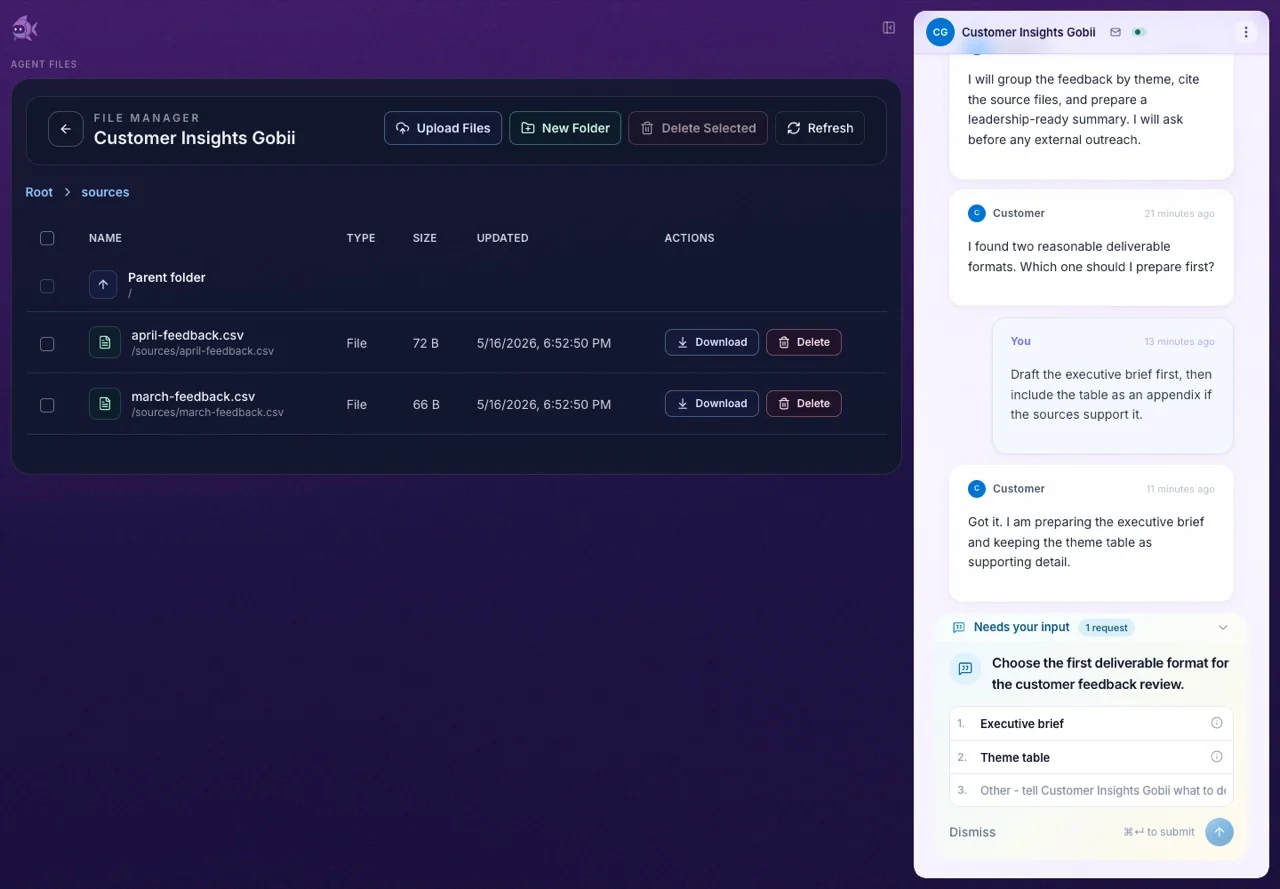
When we built file support into persistent agents, the hard part was not adding an upload control. The real requirement was continuity. A useful source file needs a stable home, the agent needs to distinguish it from stale versions, and collaborators need a traceable output after the conversation scrolls away. Filespace supplies that working boundary. Use chat attachments for a single request. Move durable reference material, recurring inputs, and finished deliverables into clearly named folders.
For workflows that begin in a browser, Browser Intelligence can preserve screenshots and downloads before the file-processing stage. When one specialist needs to hand a file to another, Agent Peer File Sharing keeps the artifact attached to the handoff rather than forcing a manual download and re-upload.
What Files Can an AI Agent Read and Create?
The January 2026 release covered four broad input families: PDFs, CSVs, images, and office documents. Current results still depend on layout, scan quality, password protection, size, and the requested operation. The 2025 DocBench benchmark used 229 real documents and 1,102 questions across five domains because raw-file reading includes text, tables, figures, metadata, and unanswerable requests, not just plain text (ACL, DocBench, retrieved July 20, 2026).
Use the file type as a starting point, then define what the agent should preserve:
| Input | Good first task | Useful output | Review focus |
|---|---|---|---|
| Text PDF | Extract named fields and cite page numbers | CSV, brief, or comparison table | Missing sections, wrong field mapping, unsupported conclusions |
| Scanned PDF or image | Describe visible content and recover key details where readable | Structured notes or exception list | OCR errors, handwriting, rotation, low contrast, charts |
| CSV | Normalize columns, deduplicate rows, calculate summaries | Clean CSV or analysis report | Types, row counts, formulas, dropped records, encoding |
| Office document | Compare versions, summarize clauses, apply a template | Revised document or change log | Formatting loss, comments, tracked changes, embedded objects |
| Mixed file set | Reconcile facts across documents | Source-linked dossier or matrix | Contradictions, file versions, incomplete evidence |
Do not infer support from a file extension alone. A PDF may contain selectable text, scanned pages, complex tables, signatures, or all four. A CSV may use an unusual delimiter or carry dates that look like integers. An office file may include macros, comments, or embedded sheets. Start with a representative sample, state the expected output, and make ambiguity visible instead of asking the agent to "process everything."
When the deliverable needs to remain collaborative, Google Sheets automation can put validated rows into a selected workbook. A disposable export belongs in filespace. The destination should follow the next reviewer, not the tool that happened to create the data.
18 Practical AI Document Automation Workflows
The strongest document workflows pair a stable method with changing files. Google tested its document models against text, forms, receipts, document questions, layout, and other tasks, while DocBench spans academia, finance, government, law, and news (Google Cloud, Document AI, 2026; ACL, DocBench, 2025). That range is a reminder to define one reviewable output at a time.
Recruiting
- Resume screening: PDF resumes to a criteria-linked CSV. Keep final candidate decisions with a recruiter.
- Candidate briefs: Combine the job description and resume into a one-page interview brief. Require evidence for every claim so an interviewer can trace it back to the source.
- Offer review: Offer PDF to a terms table that flags missing or inconsistent fields without giving legal advice.
- Interview synthesis: Notes from several interviewers to a structured summary that preserves disagreement.
- Portfolio review: Portfolio files to a skill matrix with source pages or artifact names.
Sales and research
- Annual-report research: A 10-K or annual report to a source-linked account brief.
- Stakeholder research: Approved profiles and notes to a deduplicated contact CSV.
- Competitor analysis: Product PDFs and captured pages to a dated comparison matrix.
- Market research: Whitepapers to a one-page evidence brief with publication dates and methodology notes.
- Transcript analysis: Interview or call transcripts to a theme table with supporting excerpts.
- CRM cleanup: Exported CSV to normalized values, duplicate candidates, and a separate exception file.
Finance and operations
- Invoice intake: Invoice PDF to a review table containing vendor, date, amount, line items, and exceptions.
- Expense reconciliation: Match receipts against a card export, then send missing, duplicate, or uncertain charges to a separate exceptions CSV.
- Policy comparison: Two policy versions to a change log that identifies added, removed, and altered clauses.
- Recurring reporting: Source spreadsheets and narrative notes to a draft report with reconciled totals.
Content and customer work
- Content repackaging: Approved research documents to a brief, outline, and source ledger.
- Support case synthesis: Reconstruct a timeline from the ticket export and attachments. Keep unresolved questions separate from established facts.
- Customer feedback analysis: Survey CSVs and interview notes to a theme matrix with counts and representative evidence.
The file type is rarely the real workflow. "PDF to CSV" sounds specific, but it omits the business contract. Which fields? How should duplicates be handled? What happens when a value is absent? Who owns the final decision? The durable automation lives in those rules. AI agent workflows explains how to combine a trigger, context, action, check, and delivery channel around that contract.
How Should You Prompt an AI Document Workflow?
A good document prompt names at least five things: input, task, schema, checks, and exception behavior. Google publishes separate limits for online and batch processors, including 15-page synchronous and 500-page batch ceilings for one Enterprise OCR configuration (Google Cloud, processor list, retrieved July 20, 2026). Those are Google limits, not Gobii limits, but they show why scale and execution mode must be explicit.
Use this prompt structure:
Use
/sources/q2-vendor-invoices/as the input. For every readable invoice, extract vendor name, invoice number, invoice date, currency, subtotal, tax, and total. Return/outputs/q2-invoice-review.csv. Preserve one row per invoice. Confirm subtotal plus tax equals total within $0.02. Put unreadable, duplicate, or inconsistent documents in/outputs/q2-invoice-exceptions.csvwith the filename and reason. Do not send or post anything. Summarize counts and unresolved issues in the timeline.
Why does this work? It replaces a vague outcome with a testable contract:
- Input boundary: one named folder, not the whole workspace.
- Output schema: eight specific columns and two files.
- Reconciliation: a numerical tolerance rather than "check the math."
- Exception path: no silent guessing when a document cannot be read.
- Action boundary: files may be created, but nothing leaves the workspace.
For a one-off job, put those rules in chat. If the same logic recurs, let automatic Agent Skills preserve the stable procedure while file contents stay fresh. Larger jobs can benefit from visible agent planning so you can inspect the extraction, validation, and delivery stages before the agent commits too much work.
Where Does OCR End and Document Automation Begin?
OCR recovers characters; document automation completes a job around those characters. The DocVQA dataset contains 50,000 questions across more than 12,000 document images, and its original baselines remained well below 94.36% human accuracy when structure mattered (Mathew, Karatzas, and Jawahar, DocVQA, retrieved July 20, 2026). Reading order, tables, labels, and visual relationships therefore belong in the workflow design.
Think of the stack this way:
| Capability | Example | What can still go wrong |
|---|---|---|
| OCR | Convert a scanned invoice into text | Digits, punctuation, columns, or reading order may be wrong |
| Layout understanding | Associate labels with values and preserve tables | Unusual templates or nested sections can confuse relationships |
| Document reasoning | Compare clauses or answer a question across pages | The answer may omit evidence or overstate an inference |
| Agent workflow | Research a missing value, create a file, and route an exception | Wrong tools, stale sources, unsafe actions, or weak checks can spoil the result |
A workflow should expose the layer that failed. If the amount was read incorrectly, fix the scan or extraction. If the amount was read correctly but mapped to the wrong field, fix the schema. If fields are right but the final total is wrong, fix the rule or calculation. If the file is correct but sent to the wrong place, fix the action boundary. "The AI got it wrong" is not a useful diagnosis.
How Do You Validate AI-Generated Documents?
Validation should test the deliverable, not the fluency of the explanation. DocBench evaluates 1,102 questions across text-only, multimodal, metadata, and unanswerable categories because a polished answer can still miss a table, invent a value, or ignore that the file lacks the requested fact (ACL, DocBench, retrieved July 20, 2026).
Match the check to the output:
| Output | Minimum validation |
|---|---|
| Extracted CSV | Required columns, row count, type checks, duplicate policy, sample against source pages |
| Financial table | Reconcile subtotals, taxes, totals, currency, sign, and reporting period |
| Summary | Link each material claim to a page, section, row, or named source file |
| Comparison | Confirm both versions, effective dates, exclusions, and unresolved conflicts |
| Ranked list | Preserve the rubric, evidence for each score, tie handling, and human decision owner |
| New PDF or office file | Inspect text, layout, page breaks, links, tables, and accessibility before external use |
Start with a golden set of representative files. Include clean documents, awkward layouts, missing fields, duplicates, and at least one unreadable input. Record expected outputs and exceptions. Run the same checks after prompt, model, parser, tool, or template changes. For numerical work, compare totals programmatically when possible. For subjective work, use a reviewer who did not write the draft.
Human review should scale with consequence. A research brief may need source sampling. A payment file needs full reconciliation and authorization. A candidate-ranking artifact needs recruiter ownership and bias-aware review. NIST's AI Risk Management Framework names human-AI roles in Govern 3.2 and documented oversight in Map 3.5 (NIST, AI RMF Core, retrieved July 20, 2026). Those are operating requirements, not a checkbox at the end.
Security and Governance for Document Workflows
Uploaded files need layered controls because no single validation technique is sufficient. OWASP's current File Upload Cheat Sheet recommends allowlisted extensions, content-type and signature checks, generated filenames, size limits, authorization, storage outside the webroot, malware or sandbox analysis, and CSRF protection (OWASP, File Upload Cheat Sheet, retrieved July 20, 2026).
For users, the most important practices are simpler:
- Store credentials in scoped secret storage, never in an ordinary document or chat message.
- Give the agent only the files and systems required for the job.
- Separate source files, working files, final outputs, and exceptions with clear names.
- Treat instructions inside untrusted documents as content, not as authority to change the agent's task.
- Remove stale or duplicate files that could be mistaken for the current version.
- Review generated files before external sharing, especially when they contain personal, financial, legal, or employment information.
Policy can fail during synthesis, even when the model appears to understand the rule. The July 2026 Doc-PP benchmark tested policy-bound questions over multimodal reports. Its Decompose-Verify-Aggregate method reduced measured leakage from 64.6 to 30.5 for Gemini-3-Flash-Preview, 93.5 to 24.5 for Qwen3-VL, and 76.8 to 41.6 for Mistral-Large (ACL, Doc-PP, retrieved July 20, 2026).
The operational lesson is to separate transformation from release. Let the agent extract and draft inside the workspace. Validate fields, totals, evidence, and policy against the intended recipient. Then approve the external handoff. Gobii's production sandboxing model describes the runtime boundary, while one-click integrations explains how provider scopes and selected resources narrow what an agent can reach.
Frequently Asked Questions
Document reading remains an evaluation problem, not a solved checkbox. DocBench's 2025 test set spans 229 files, 1,102 questions, five domains, and four question categories, including requests that cannot be answered from the document (ACL, DocBench, retrieved July 20, 2026). These answers set practical boundaries for production workflows.
What is AI document automation?
AI document automation uses software to read document content, organize or transform it, and produce a defined output with less manual handling. A complete workflow includes the file source, extraction or interpretation method, business rules, validation checks, destination, and a human review point when errors carry meaningful consequences.
Which files can Gobii agents read and create?
Gobii's original bidirectional attachment release covered PDFs, CSVs, images, and office documents. Actual success depends on file quality, size, layout, password protection, and the requested output. Start with one representative file and a precise output contract before expanding a workflow to larger batches.
How can I send a file to a Gobii?
Gobii currently documents seven file routes: chat, email, SMS or MMS, the file manager, agent-created files, peer handoffs, and Remote MCP or supported integrations. Use a chat attachment for one request and filespace for inputs or outputs that should remain available by stable name or path.
Can AI document automation replace human review?
Not for every workflow. Human review should remain where a wrong extraction, ranking, calculation, disclosure, or external message could affect money, employment, compliance, or customer trust. Low-risk transformations can use spot checks, while consequential outputs need defined owners, tolerances, source references, and approval before release.
What is the difference between OCR and AI document automation?
OCR converts visible characters into machine-readable text. AI document automation can use that text plus layout, images, instructions, tools, and business rules to classify a document, extract fields, compare records, create a new file, or route an exception. OCR is one possible input step, not the entire workflow.
Put Your Files to Work
The search opportunity is attainable because "AI document automation" measured 90 monthly U.S. searches at difficulty 11 in our July 2026 DataForSEO snapshot. The product opportunity is more concrete: Gobii can take files through seven documented routes, use them in persistent work, and return finished artifacts. The value comes from a precise contract and a reviewable result, not the upload itself.
Choose one bounded workflow. Pick a representative file, name the output fields or sections, add two checks, and state what the agent should do when information is missing. Keep the first result inside the workspace. Compare it with the source, tighten the rules, and only then expand the volume or destination. If the work repeats, preserve the method while the source files and business facts remain fresh.
Related workflows: Design a persistent AI agent workflow, move files between specialist agents, or send validated rows to Google Sheets.