
Dedicated IP for AI Agents: Stable Access With Gobii
Route supported Gobii workflows through 1 stable outbound IP for firewall allowlists, predictable audits, and controlled access across browser and API work.
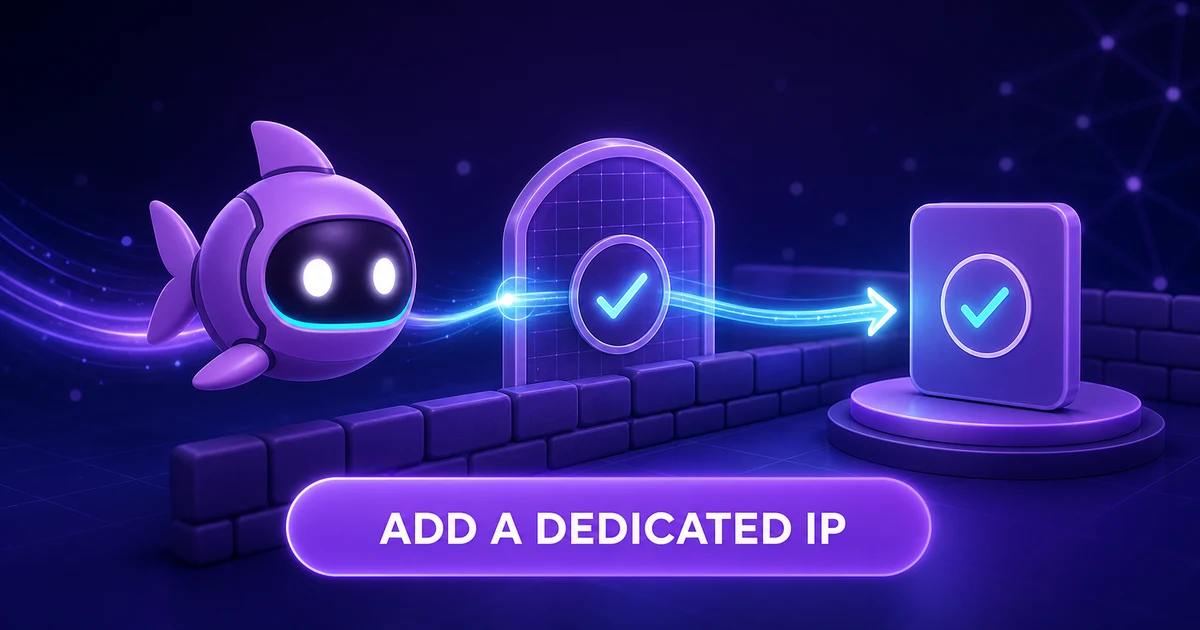
A dedicated IP for AI agents gives their work a stable network address. That matters when a portal, private API, or firewall accepts traffic only from known sources. The Gobii does the job while the site sees one steady outbound IP.
That address is one layer, not a master key. It does not sign in, grant a role, encrypt traffic, or approve an act. Pair it with a scoped login, least-privilege rights, and the safeguards in our guide to running AI agents safely in production.
Key takeaways
- A dedicated IP gives supported Gobii workflows a stable outbound network identity for allowlists and clearer logs.
- The counterparty still needs to check the agent's account or key and allow the requested act.
- Start with one read-only test, confirm the source IP in site logs, and record each system that depends on it.
In this guide
What Is a Dedicated IP for an AI Agent?
A dedicated IP is a fixed outbound address assigned to supported agent workflows. It is also called a static egress IP. When the agent opens a page or makes a covered request, the upstream host sees that steady source address.
Cloud work may use shared or changing outbound addresses. That is fine for public sites. However, it fails when a firewall uses an IP allowlist: a rule that accepts named addresses and rejects the rest.
Gobii's current Dedicated IP docs recommend the feature for vendor allowlists, internal services, steady egress, and network audits. Access may depend on your plan and setup. Self-hosted users control egress in their own stack (Gobii, Dedicated IPs, retrieved July 19, 2026).
Think of it as the return address on a package. It shows the route. The package still needs the right recipient, contents, and permission to enter.
How Does Gobii Route Traffic Through a Dedicated IP?
Gobii sends supported outbound work through the fixed egress route assigned to the agent. The recipient receives the connection from the address your admin adds to its allowlist.
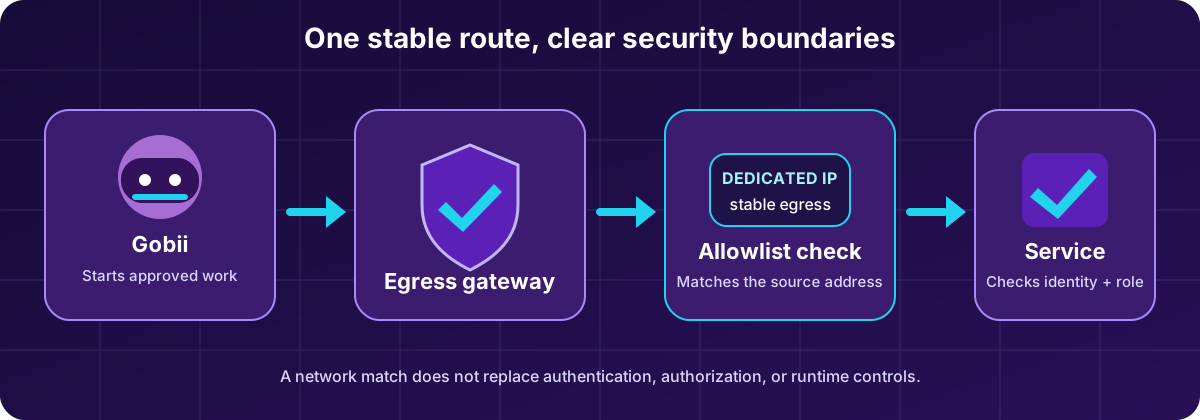
The fixed IP marks the outbound route. The protected resource still checks the account, token, role, and requested act.
The path has four useful checkpoints:
- The Gobii starts approved work. Its charter, tools, schedule, or incoming event defines the task.
- The runtime selects the assigned egress route. Supported network traffic leaves through the reserved address.
- The receiver checks its network rule. A firewall or vendor compares the source address with its allowlist.
- App controls still run. Login, API key, role, tenant, and action checks decide what the agent may do next.
As a result, failures are easier to sort. A perimeter rejection points to the address policy. A 401 or sign-in page points to login. A 403 often points to rights. One request can pass a gate and fail the next.
What Does a Dedicated IP Solve?
A dedicated IP solves source-address consistency. It helps when a system cares where a request came from or when operators need one network marker in logs.
| Workflow | Problem with changing egress | What the dedicated IP adds |
|---|---|---|
| Vendor or client portal | The portal accepts only preapproved source addresses. | One address the portal owner can add to its allowlist. |
| Private API | A valid API key is rejected outside an approved network range. | A stable route that can satisfy the network rule. |
| Operations dashboard | Shared egress makes source logs harder to interpret. | A consistent address for network-level tracing. |
| High-value browser workflow | The site flags changing addresses or blocks unknown ones. | A predictable source for the approved agent workflow. |
For example, this helps AI agents that automate logged-in websites. A saved browser session can keep valid site state, while the fixed IP keeps the network source steady. Neither one can overrule MFA, CAPTCHA, roles, session expiry, or terms of use.
Dedicated IP vs Authentication, Authorization, and Sandboxing
Network identity, user identity, permission, and runtime containment answer different questions. Treating them as interchangeable creates a weak control plane.
| Control | Question it answers | What it does not prove |
|---|---|---|
| Dedicated IP | Did the request leave through an approved network route? | Which account made it, or whether the action is allowed. |
| Authentication | Which account, service identity, or key is making the request? | Whether that identity may perform this action. |
| Authorization | Which records, actions, and environments may the identity use? | Whether the runtime is isolated from other work. |
| Sandboxing | Where can agent tools, files, code, and browser work run? | Whether the destination accepts the source address. |
NIST's 2020 Zero Trust Architecture says a network location alone should not earn trust. Login and permission remain separate checks (NIST, SP 800-207, retrieved July 19, 2026). Gobii's current guidance says the same: a fixed IP does not replace authentication, authorization, or least-privilege credentials.
Importantly, a stable source IP does not encrypt a request. Use HTTPS or the service's secure protocol, protect secrets in Gobii, and keep risky writes behind review.
When Should You Use a Static Egress IP?
Use one when a real network rule requires a known source address. Do not add cost and upkeep merely because the task feels important.
A strong fit has at least one of these needs:
- The system owner will not open access until you provide an outbound IP.
- A vendor ties an API credential to an approved IP or range.
- A private service sits behind a firewall that cannot identify the Gobii another way.
In contrast, skip it when the endpoint has a narrower path and needs no allowlist. One-click agent integrations, Remote MCP, the Agent API, and inbound webhooks each use their own access checks. A fixed IP does not prove who called those surfaces. It applies only to supported outbound traffic the Gobii sends after they start or manage work. Consult the live product reference for route coverage.
How Do You Add and Assign a Dedicated IP?
Add the option in billing, then assign the ready address to the intended Gobii. Price and access depend on plan and setup, so use the live billing screen as the source of truth.
- Open Gobii Billing.
- Find the Dedicated IP controls and add the quantity you need.
- Wait until the address is ready and shown as available.
- Open the intended Gobii and go to its full settings page.
- Select the dedicated address in the Dedicated IP section, then save the change.
- Copy the exact address into the receiving firewall or vendor allowlist.
Gobii's Dedicated IP setup guide covers purchase and assignment. The Billing, Usage, and Tasks guide lists the feature among the add-ons an account may manage. Teams should also catalog dependent jobs and retire unused addresses (Gobii, Dedicated IPs for administrators, retrieved July 19, 2026).
Specifically, do not add a whole range when the remote host accepts one address. A narrow rule is easier to review and revoke.
A Safe Allowlist Rollout
Start with one protected resource, one Gobii, and one reversible read. This sets a clean baseline before a recurring job or write depends on the route.
Use this rollout sequence:
- Name an owner. Record who manages the Gobii, access policy, and service key.
- Add the exact address. Limit the rule to the needed host, port, environment, and protocol when possible.
- Run a read-only probe. Ask the Gobii to fetch one harmless record or page and return evidence.
- Check both sides. Confirm the Gobii timeline shows the task and the recipient log shows the dedicated source IP.
- Test a rejection. Use a blocked resource or low-privilege identity to prove that network access does not widen app rights.
- Record and expand. Note the IP, agent, endpoint, owner, test date, and rollback. Add writes only after the read path stays reliable.
In our experience, the best test splits network success from task success. First prove the server accepts the route. Then prove the account has the right role. Last, prove the Gobii stops at the stated boundary.
What Should a Dedicated IP Change Record Include?
A dedicated IP change record should let another operator understand the need, recreate the rule, inspect the proof, and reverse the change without guessing. Keep it beside the firewall or vendor ticket, not in an agent prompt.
Capture three groups of detail:
- Purpose and ownership: workflow name, business reason, data class, environment, asset custodian, technical owner, approver, review date, and renewal status.
- Technical scope: Gobii ID, account context, egress address, target hostname, CIDR notation, transport protocol, destination port, DNS assumptions, service identity, and the narrow resource being opened.
- Evidence and recovery: change ticket, test timestamp, firewall event ID, request path, HTTP response code, redacted screenshot, Gobii timeline entry, expected-denial result, rollback contact, and reversal deadline.
This record turns an invisible routing choice into an auditable dependency. It also gives incident responders a fast answer when a vendor changes hosts, a token expires, a DNS record moves, or a teammate retires the add-on. Never copy tokens, cookies, passwords, private keys, or full payloads into the ticket. Link to the managed secret by name instead.
Troubleshooting Dedicated IP Access
| Symptom | Likely layer | Next check |
|---|---|---|
| Connection times out or is refused | Network rule, host, port, or route | Compare the assigned IP with the gateway policy and confirm the required port. |
| The endpoint returns `401` | Authentication | Check the account, API key, secret scope, and token expiry. |
| The application returns `403` | Authorization or policy | Confirm the identity has the required role and the service permits automation. |
| The IP is missing from settings | Billing, provisioning, or account context | Confirm the add-on exists in the active personal or organization billing context. |
| Logs show an unexpected source address | Assignment or unsupported path | Confirm the intended Gobii has the address assigned and the workflow is covered by Dedicated IP routing. |
Change one layer at a time. If you alter the firewall, token, agent instruction, and target URL together, the next success will not tell you which fix mattered.
Frequently Asked Questions
Does a dedicated IP make an AI agent secure?
No. It gives supported traffic a stable source. Security still needs valid accounts, narrow roles, encryption, sandboxing, safe secrets, review gates, and logs.
Is a dedicated IP the same as a VPN?
No. A dedicated IP is the source that a target sees for supported Gobii work. A VPN is a broader tunnel for users, devices, or networks.
Can several AI agents use the same dedicated IP?
That depends on the Gobii setup and account rules. Check the live settings and docs first. If agents share an address, site logs need account or agent records to tell their work apart.
Does the dedicated IP cover browser automation and API calls?
It covers supported Gobii workflows in the current product docs. Confirm the exact path before a firewall rule or audit promise. Self-hosted egress depends on your stack.
What happens if I remove or reassign the IP?
Any rule tied to the old address can stop matching. Record it, test the new route, update the allowlist, and keep a rollback plan until the new path works.
Ready to Give Your Agent a Stable Network Route?
A dedicated IP removes one unknown from agent work: the outbound address. It gives firewall owners one value to allow and gives operators a steady marker in network logs.
Keep the boundary honest. The IP tells a site where the link came from. Credentials prove identity. Roles limit access. Sandboxing contains the work. Logs show what happened.
Start with one read-only path and verify both sides before you rely on it.