
How to Hire AI Employees for Business Workflows
A practical guide to scoping, deploying, supervising, and measuring AI employees that own defined business workflows.
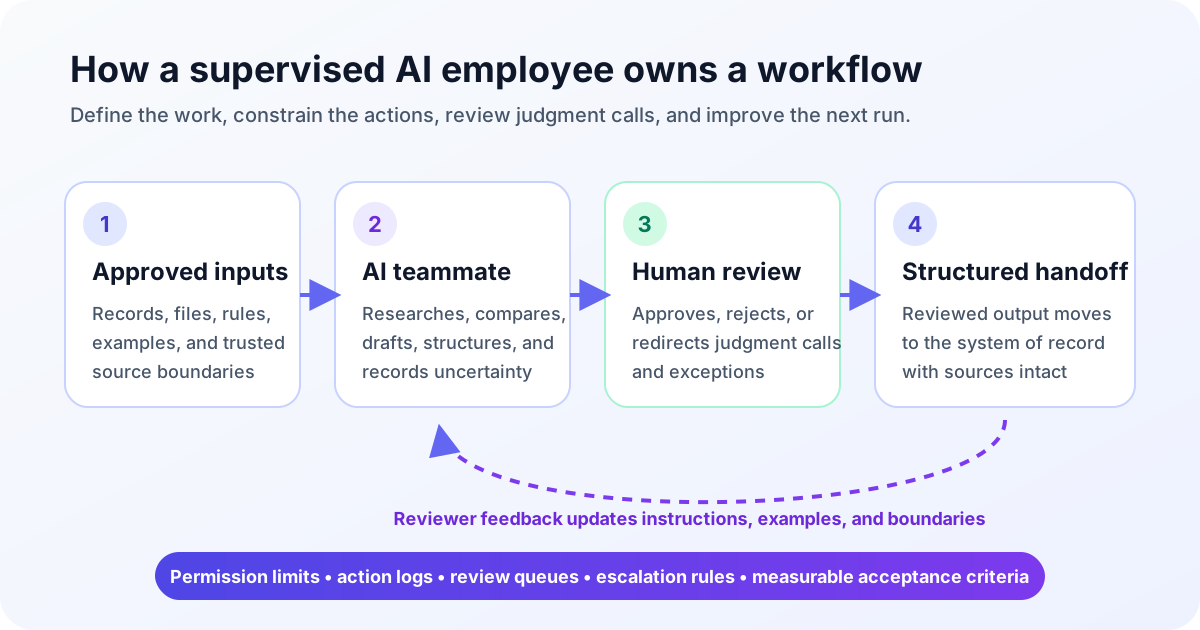
Hiring an AI employee is less like buying generic software and more like assigning ownership of a supervised workflow. The goal is not to find a tool that can do anything. It is to define useful work, give an AI teammate the right context and access, and decide where a person reviews the result.
That operating model makes the role manageable. You know what the AI employee receives, what it may do, which systems it touches, and when it must ask for help. If you are still evaluating the category, start with an overview of AI employees.
Short Answer: How to Hire AI Employees
To hire AI employees, choose one repeatable workflow, define the role around a measurable handoff, connect only the systems it needs, and start with narrow permissions. Set review and escalation rules before launch. Then run a 30-day pilot that measures usable output, correction effort, cycle time, and exceptions. In its 2023 AI Risk Management Framework 1.0, NIST calls for teams to define supported tasks, deployment scope, human oversight, and evaluation methods.
Use this six-step framework:
- Choose the workflow. Find recurring work with recognizable inputs, rules, and outputs.
- Write the role brief. Name the goal, trigger, tools, actions, boundaries, and reviewer.
- Map access. Decide which systems are read-only, which allow drafts, and which permit changes.
- Pilot a real queue. Use representative work, including incomplete inputs and edge cases.
- Review and redirect. Approve good output, correct errors, and turn feedback into instructions.
- Measure the first 30 days. Compare results with the old process before expanding access or volume.
The same framework applies when teams hire AI workers or deploy AI employees. Start with the job, not the persona or product demo.
Choose the Workflow Before the Tool
A good first workflow matters but remains easy to inspect. It has a starting signal, repeatable path, and output someone knows how to judge. Research, sourcing, triage, reporting, and operations follow-up often fit.
Ask four questions before comparing products:
- What starts the work: a schedule, new record, inbox item, file, or human request?
- Which decisions follow explicit rules, and which still require judgment?
- What finished artifact should appear, and where should it go?
- Who can quickly tell whether the result is useful, incomplete, or wrong?
| Example workflow | Inputs | Allowed actions | Systems touched | Human review |
|---|---|---|---|---|
| Sales research | Account list, ideal-customer criteria, approved sources | Research, enrich, cite, flag gaps | Browser, spreadsheet, CRM-ready export | Seller checks fit before records move downstream |
| Recruiting sourcing | Role brief, location, skills, exclusions | Find candidates, compare criteria, prepare notes | Browser, ATS-ready sheet or file | Recruiter reviews matches before outreach |
| Support triage | New tickets, routing rules, account context | Classify, summarize, draft, escalate | Help desk, knowledge base | Support lead reviews sensitive or uncertain cases |
| Recurring reporting | Source files, metric definitions, reporting schedule | Collect, reconcile, calculate, draft commentary | Files, spreadsheets, documents | Owner validates exceptions and final narrative |
| Operations follow-up | Open items, due dates, owners, status rules | Check status, prepare reminders, update a queue | Project tracker, inbox, shared sheet | Operations owner approves external messages or changes |
Do not begin with “help the sales team” or “handle recruiting.” Those are departments, not workflows. Start with: “Every Tuesday, research these accounts, fill these fields from approved sources, cite each source, and send low-confidence records to review.”
A Gobii implementation lesson: test the handoff
During Gobii's implementation of browser workflows, we learned that reaching the right page was not the same as finishing the assignment. Earlier agents could browse, but they could not reliably preserve screenshots or downloaded files for later steps. A report without the captured page, PDF, or export gave the reviewer less evidence and could break the downstream handoff.
That recurring gap led to Gobii's capture, save, and understand workflow: capture the page, persist the artifact in filespace, and make visual files available for inspection. The practical lesson is to test artifact delivery as part of the role. Do not mark a browser workflow complete merely because the navigation succeeded.
Define the AI Employee Role
Define the AI employee role as an operating contract. A job title helps people discuss it, but the role brief determines whether the work is repeatable.
Write a one-page role card with these fields:
- Outcome: the business result this workflow supports.
- Trigger and cadence: when work begins and how often it runs.
- Inputs: records, files, messages, examples, and instructions it receives.
- Actions: what it may search, compare, write, classify, or update.
- Systems: every browser destination, app, file store, and system of record.
- Output: exact fields, format, destination, and completion standard.
- Boundaries: prohibited sources, data, actions, and claims.
- Reviewer: the person accountable for approval and redirection.
- Escalations: conditions that stop the workflow or create an exception.
The handoff is more important than the persona. “AI recruiter” sounds concrete, but “deliver 25 source-linked candidate profiles that meet these criteria to this review queue” is manageable. It defines ownership without pretending the AI teammate has human judgment or authority.
Include one accepted record, one rejected record, and the reason for each decision. Examples expose implicit rules, such as what counts as a credible source or an unusable record.
Connect Systems and Permissions
Connect only the systems required by the role card. Match each permission to a named action, use the narrowest scope that works, and keep credentials separate from workflow instructions.
In its 2025 LLM06 Excessive Agency guidance, OWASP recommends limiting agent functionality and downstream permissions to the minimum required. It also recommends explicit human approval for high-impact actions. Those controls belong in the system and integration layer, not only in an AI employee's written instructions.
A practical permission ladder has four levels:
- Read: view approved pages, records, files, or messages.
- Prepare: create a draft, proposed change, or structured export without publishing it.
- Update with review: change a system only after a person approves the specific action.
- Act within policy: perform a low-risk, reversible action under explicit rules and logging.
Most pilots should begin with reading and preparation. A sales research teammate can prepare a source-linked CRM import before editing records. A support triage teammate can draft before it can send. Expand permissions only after reliable work on the same workflow.
Document data boundaries too. Specify which records may enter, what can be retained, permitted destinations, and prohibited output. In its AI and data protection guidance, updated in 2023, the UK Information Commissioner's Office advises organizations using AI to process only the personal data needed for a defined purpose and to include data minimization in design and procurement. See its guidance on security and data minimization in AI.
Reviewers should also be able to trace important work to its sources or action history. Gobii's guide to production AI agent safety explains how isolation, secrets, approvals, and audit trails support that boundary.
Set Review and Escalation Rules
Human review should follow risk and uncertainty. Reviewing every step creates a bottleneck, while reviewing nothing hides errors. Focus review on decisions, exceptions, and consequential actions.
In its 2024 Generative AI Profile, NIST recommends documenting human oversight roles, sharing pre-deployment test results with people who can approve release, and using human moderation where models perform poorly. In practice, the reviewer needs authority to stop, redirect, or narrow the workflow, not just edit its final prose.
Use three output queues:
- Ready for review: complete work that meets the stated checks but still needs approval.
- Needs judgment: ambiguous matches, conflicting sources, policy questions, or low-confidence conclusions.
- Blocked: missing access, invalid input, unavailable systems, or a prohibited action.
An escalation rule should name the trigger, destination, context, and required decision. For example: “If two approved sources disagree about company size, place the record in Needs judgment, link both, and ask the account owner which rule to apply.”
Treat corrections as workflow data, not isolated edits. Record why a reviewer rejected or changed an output. Repeated feedback can become a clearer rule, a new example, or a tighter boundary. One-off judgment calls should remain review items instead of quietly becoming permanent policy.
For higher-risk runs, reviewing an agent's plan before execution creates an earlier control point than reviewing only the finished artifact.
Measure the First 30 Days
Measure whether the AI employee improves the workflow, not its activity. Capture a baseline: volume, turnaround time, backlog, reviewer effort, and common errors. Otherwise, more output can hide more cleanup. NIST's 2024 Generative AI Profile recommends testing against deployment conditions, documenting evaluation results, monitoring after launch, and feeding observed issues back into go, no-go, and improvement decisions.
Run the first month in stages:
- Days 1–5: calibration. Process a representative set. Review every result and fix missing instructions.
- Days 6–14: consistency. Run more cases. Track failure patterns and edge cases.
- Days 15–21: handoff. Test the destination, fields, formatting, ownership, and notifications.
- Days 22–30: decision. Compare with the baseline and decide whether to refine, expand, or stop.
Track a compact scorecard:
| Measure | What it reveals |
|---|---|
| Usable output rate | How much work reaches the reviewer complete and correctly structured |
| Correction effort | Whether review saves time or shifts work into cleanup |
| Cycle time | Whether the handoff arrives sooner without sacrificing quality |
| Exception rate | How often the workflow encounters ambiguity, missing access, or blocked actions |
| Source and field completeness | Whether required evidence and data survive the handoff |
| Downstream acceptance | Whether the receiving person or system can use the result as delivered |
Volume is a supporting measure, not the goal. A smaller batch of review-ready records may be more valuable than a large list with unclear provenance. Keep the original workflow owner responsible for the scorecard during the pilot.
Expand From One Workflow to a Team
Expand after one workflow is stable and easy to review. Increase volume within the role, then add an adjacent handoff. Create another AI teammate only when it has a distinct responsibility.
A sales research teammate might first cover more accounts. Later, a reporting teammate could summarize accepted records and pipeline changes. Separate roles make access, quality, and ownership easier to understand.
Standardize what worked: role-card fields, permission levels, review queues, scorecards, and escalation language. If you are comparing platforms before building the next role, use the same workflow-based tests in our guide to the best AI employees.
Where Gobii Fits
Gobii helps teams deploy AI employees as supervised AI teammates. They can work across browser research and visual context, files, spreadsheets, and connected systems, then return structured, source-linked output. People set boundaries, inspect judgment calls, and decide what moves downstream.
Gobii fits account research, candidate sourcing, monitoring, reporting, enrichment, and operations follow-up. Start with a role brief containing approved inputs, permitted actions, a clear output, and a responsible reviewer. Teams can also use organization templates and creation permissions to standardize the starting configuration.
Start by mapping one workflow using the framework above. Then use Gobii to give that work a persistent cadence, visible handoff, and feedback loop.
FAQ
How do you hire AI employees?
Hire AI employees by defining one repeatable workflow before choosing a platform. Document the trigger, inputs, allowed actions, systems, output, boundaries, reviewer, and escalation rules. Start with narrow permissions, test real cases, and expand only after the work consistently reaches a usable human-reviewed handoff.
What should an AI employee do first?
An AI employee should first handle bounded, reversible work that is easy to inspect. Good starting points include research, sourcing, triage, reporting, enrichment, and follow-up preparation. The first assignment should have approved inputs, a known output format, and a reviewer who can quickly explain what passed or failed.
How do you supervise AI employees?
Supervise AI employees with explicit permissions, visible work history, review queues, and escalation triggers. Review judgment calls and consequential actions rather than every mechanical step. Record the reason for corrections, then turn repeated feedback into better instructions, examples, or boundaries while keeping one-off decisions with people.
How long does deployment take?
Deployment time depends on workflow clarity, system access, risk, and review requirements. A narrow pilot can begin once the role brief, permissions, representative cases, and reviewer are ready. Do not measure deployment only by setup speed; include calibration, real handoff testing, and a 30-day decision before expanding the role.
Sources
- National Institute of Standards and Technology, 2023, AI Risk Management Framework 1.0 Core, retrieved 2026-07-09.
- National Institute of Standards and Technology, 2024, Artificial Intelligence Risk Management Framework: Generative Artificial Intelligence Profile (NIST AI 600-1), retrieved 2026-07-09.
- OWASP GenAI Security Project, 2025, LLM06: Excessive Agency, retrieved 2026-07-09.
- UK Information Commissioner's Office, AI and data protection guidance updated in 2023, How should we assess security and data minimisation in AI?, retrieved 2026-07-09.