
Team Templates: Easier to create and launch
Gobii Team Templates now have a dedicated editor and faster launch flow from the New Agent menu for repeatable AI workflows.
If your team is starting to use AI agents for repeatable work, consistency starts to matter fast.
You want people to begin from the same proven workflows instead of reinventing the prompt every time. You also want those agents to launch with the right defaults: the right model, the right instructions, the right level of power, and the right expectations.
That is why we have been improving Team Templates in Gobii.
This builds on the organization templates and permissions update. Organization templates help standardize what agents start with. Team Templates now make those approved workflows easier to create, improve, and launch.
Template Editor For Teams
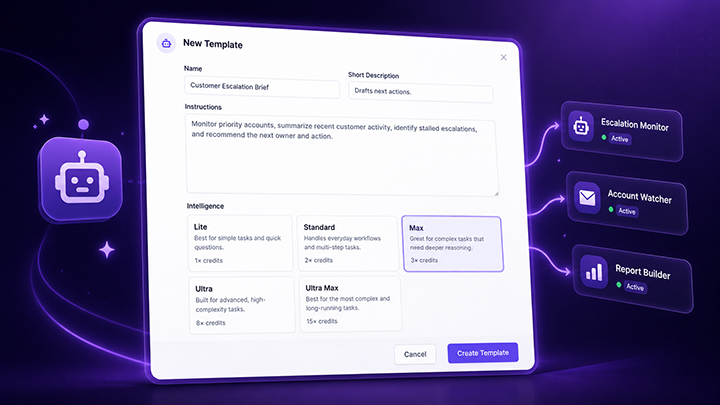
Templates can now be created and edited directly, without launching an agent first.
That means your best workflows can keep improving over time. Update the instructions, adjust the defaults, refine the setup, and keep the template aligned with how your team actually works.
New Agent Dropdown
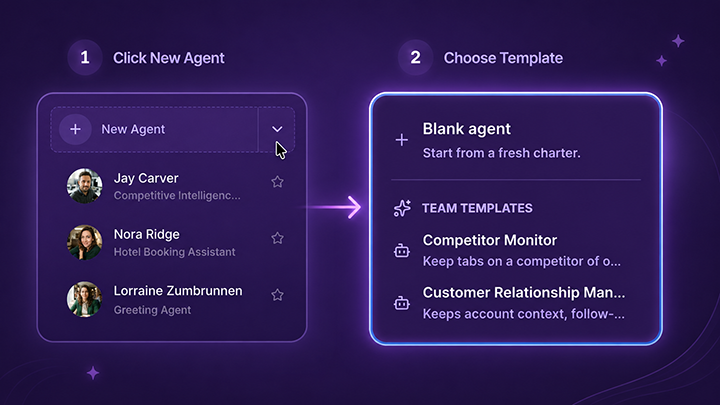
Templates are now easier to launch from the New Agent button inside your Team.
Instead of hunting around or remembering which setup to use, teammates can start from an approved template in just a couple clicks.
Before: "I think we already have a template for this. Where is it?"
After: "New Agent -> Select template."
Start From Repeatable Workflows
Team Templates help your team start from repeatable workflows instead of blank agents.
Create the template once. Keep improving it. Let teammates launch approved workflows faster.