How We Sandbox AI Agents in Production
A production-grade, security-first system for running AI agents: per-agent isolation, proxy-only egress, deterministic filespace sync, and auditable execution.
Isolation, proxy-only egress, filespace sync, and auditability at scale.
TL;DR
Running AI agents in production means untrusted code, real files, and real network access. We built a sandboxed compute system with per-agent isolation, NetworkPolicy-enforced egress, deterministic filespace sync, strict timeouts, and full audit trails. This post walks through the threat model, the architecture, and the mechanics of how we keep powerful agent capabilities safe in production. If you want to see the real implementation, the OSS code is here:
https://github.com/gobii-ai/gobii-platform
We also publish the minimal sandbox compute supervisor used inside the pods:
https://github.com/gobii-ai/sandbox-compute-server
1) What “agents in prod” actually means
The moment agents touch the real world, the threat surface explodes: untrusted code, arbitrary URLs, filesystem mutation, and long‑lived state. If you treat that like a standard container workload, you’re betting your infrastructure on “nothing ever goes wrong.” The core security problem is not a single exploit. It is a chain of small weaknesses: weak isolation, leaky egress, non‑deterministic filesync, and missing audit trails.
Security here is not a single feature. It’s a system. An isolation boundary without network controls is insufficient. Network controls without audit logs are insufficient. Sync without determinism is insufficient. Every layer has to hold.
2) Constraint stack (why this is hard)
These were the non‑negotiables for production:
- Per‑agent isolation
- Proxy‑only egress, fail‑closed
- Deterministic filespace sync
- Strict timeouts and stdout/stderr caps
- Full audit trail
- Cost/latency ceilings that still let the product scale
If you get one of these wrong, the system becomes unsafe or unusable. The difficult part is not building any single component. It is making the whole stack hold under adversarial inputs.
3) Why give agents real capabilities at all?
“Demo agents” can do toy tasks. Production agents need real capabilities:
- Full browser automation for real websites (auth, JS, dynamic flows)
- MCP tools and MCP servers for real integrations
- File manipulation for durable outputs and handoff
- Code execution for data transformation and automation
We don’t grant these capabilities for novelty. We grant them because real work requires them, then we put them inside a sandbox by default.

def route_capability(capability: str) -> str:
    if capability in {"browser", "files", "code_exec", "mcp_server"}:
        return "sandbox"
    return "trusted"
4) Threat model + design goals
We explicitly designed against the risk classes that appear in modern agent systems:
- Prompt injection and indirect prompt injection
- Tool abuse and excessive agency
- Data exfiltration via outbound network access
- Lateral movement through external services
The security model therefore focuses on:
- Isolation: agent code never runs in the trusted worker process
- Egress control: proxy‑only egress, enforced by policy
- Deterministic sync: file conflicts resolve in a predictable way
- Auditability: every tool call is logged with a params hash
These risks are documented in LLM security frameworks. OWASP's LLM Top 10 lists prompt injection and excessive agency, and MITRE ATLAS highlights real-world prompt injection and data exfiltration patterns. That is the exact surface we constrain. OWASP LLM Top 10, MITRE ATLAS.
5) Architecture overview
We split the system into a trusted control plane and untrusted per‑agent compute. Kubernetes gives us the orchestration surface; a sandboxed runtime provides the kernel boundary. In GKE, sandboxed pods are requested via runtimeClassName: gvisor. GKE sandbox pods, RuntimeClass.

Control plane orchestrates sessions, selects proxies, and syncs files.
Sandbox pods execute tools, code, and MCP servers.
Egress proxy pods are the only allowed route to the internet.
6) Execution path (tool call end‑to‑end)
When an agent calls a tool, the control plane ensures a session exists, routes the call into the sandbox, and syncs workspace changes back to the filespace. The same flow is used for run_command, python_exec, file creation, and MCP tool execution.
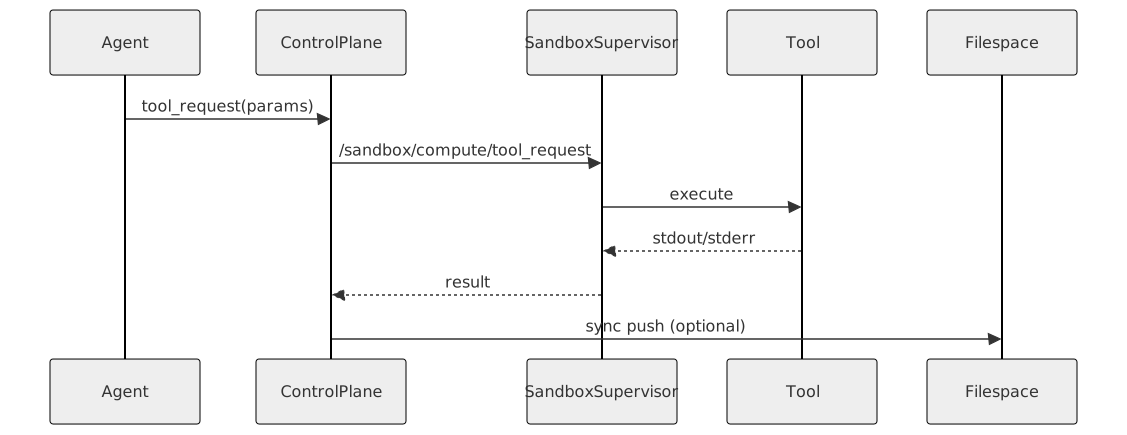
def execute_tool(agent, tool_name, params):
    session = ensure_session(agent)
    result = sandbox.tool_request(session, tool_name, params)
    if result.ok and sync_on_tool_call:
        sync_filespace_push(agent, session)
    return result
Tool execution is bounded by timeouts and stdout/stderr caps to prevent resource exhaustion. In our system those limits are centralized and enforced at the sandbox boundary.
7) Isolation boundary: gVisor userspace‑kernel sandbox
We use a userspace kernel boundary so that no system call is passed through directly to the host kernel. In gVisor, the Sentry intercepts syscalls and the Gofer mediates filesystem access, sharply reducing host kernel exposure. gVisor overview, gVisor security model.
apiVersion: v1
kind: Pod
metadata:
  name: sandbox-agent-<agent_id>
spec:
  runtimeClassName: gvisor
  serviceAccountName: sandbox-sa
  containers:
    - name: sandbox-supervisor
      image: sandbox-supervisor:latest
      securityContext:
        allowPrivilegeEscalation: false
        runAsNonRoot: true
        capabilities:
          drop: ["ALL"]
We also apply RuntimeDefault seccomp profiles to reduce syscall surface for the pod. Kubernetes seccomp.
8) Network egress: policy‑enforced, fail‑closed
Our network model is simple: sandbox pods can only talk to the per‑agent egress proxy. Everything else is denied by policy. This is enforced by Kubernetes NetworkPolicy, which implements default‑deny egress with explicit allow rules. NetworkPolicy.

apiVersion: networking.k8s.io/v1
kind: NetworkPolicy
metadata:
  name: sandbox-egress-only
spec:
  podSelector:
    matchLabels:
      app: sandbox-agent
  policyTypes: [Egress]
  egress:
    - to:
        - podSelector:
            matchLabels:
              app: sandbox-egress-proxy
DNS resolution still works because we explicitly allow egress to kube‑dns/coredns (TCP/UDP 53); everything else is denied.
Because egress is default‑deny, direct access to metadata endpoints is blocked. The proxy is the only path out.
9) MCP servers run inside the sandbox
User/org MCP servers run inside the sandbox pod alongside sandboxed tools. Platform MCP servers remain in the trusted worker process. This cleanly splits the untrusted extension surface from the trusted core.
10) Filespace sync: deterministic, conflict‑safe
We treat the filespace as a shared state layer with last‑writer‑wins conflict resolution. If the agent’s workspace changes after the last sync timestamp, it wins; otherwise the filespace wins. Deletions propagate only if they’re newer than the last known file version. We also normalize paths and disallow traversal to keep the workspace boundary intact.

def push_sync(agent, session, since):
    changes = scan_workspace_changes(since)
    response = sandbox.sync(direction="push", changes=changes)
    apply_filespace_push(agent, response.changes, response.sync_timestamp)
We hard‑cap workspace size and fail early if a write exceeds the limit. That prevents a single agent from consuming unbounded storage.
11) Session lifecycle (warm → idle → snapshot → resume)
Sandbox sessions are long‑lived, but only while they’re active. When idle:
- Sync workspace to filespace
- Snapshot disk
- Stop pod
On resume:
- Restore snapshot
- Pull filespace
- Start supervisor

12) Security invariants (non‑negotiables)
- No direct egress from sandbox pods
- No privileged containers
- All tool calls logged with params hashes
- Workspace size hard cap
- No GPUs/TPUs are exposed to agent code, by design
Inference happens outside the cluster, so sandbox workloads remain CPU‑only. That shrinks the hardware attack surface while keeping agent execution simple and auditable.
13) Auditability and forensic traceability
We log tool invocations with a deterministic hash of parameters to preserve auditability without leaking secrets. That gives us a durable, queryable event stream for incident response.
Sandbox tool_request agent=<id> tool=<name> params_hash=<sha256> duration_ms=<n> exit_code=<n>
14) External dependencies are still part of the perimeter
Any external service the sandbox can reach becomes part of your security boundary (databases, APIs, storage drivers). We minimize those surfaces and apply least‑privilege policies, because isolation is meaningless if the dependencies are wide‑open.
15) Failure modes and edge cases
We design for failure explicitly:
- Proxy outage → fail‑closed, no direct egress
- Sync conflicts → deterministic last‑writer‑wins resolution
- Large outputs → stdout/stderr caps
- Path traversal attempts → rejected at the workspace boundary
These are the cases that quietly break naive sandbox designs.
16) Tradeoffs
Sandboxing isn’t free:
- Syscall‑heavy workloads cost more (userspace kernel overhead)
- Privileged workloads aren’t compatible
- Certain kernel features are unavailable by design
We accept those tradeoffs intentionally, because the alternative is an unbounded attack surface. gVisor is explicit about this tradeoff profile and where it is (and isn’t) the right boundary. gVisor docs.
17) What’s next
- Tighter policy enforcement
- Faster resume paths
- Deeper audit trails
References
- GKE sandbox pods (
runtimeClassName: gvisor):
https://cloud.google.com/kubernetes-engine/docs/how-to/sandbox-pods - gVisor overview (userspace kernel model):
https://gvisor.dev/docs/ - gVisor security model (no syscalls passed through directly):
https://gvisor.dev/docs/architecture_guide/security/ - Kubernetes RuntimeClass (per‑pod runtime selection):
https://kubernetes.io/docs/concepts/containers/runtime-class - Kubernetes NetworkPolicy (default‑deny egress model):
https://kubernetes.io/docs/concepts/services-networking/network-policies/ - Kubernetes seccomp (RuntimeDefault profiles):
https://kubernetes.io/docs/reference/node/seccomp/ - OWASP Top 10 for LLM Applications (prompt injection, excessive agency, plugin risks):
https://owasp.org/www-project-top-10-for-large-language-model-applications/ - MITRE ATLAS / Generative AI security risks (real‑world AI attack cases):
https://www.mitre.org/news-insights/news-release/mitre-and-microsoft-collaborate-address-generative-ai-security-risks - Diagram tooling: Mermaid (also backed by Open Core Ventures, like Garak):
https://mermaid.ai/ - Open Core Ventures (background reference):
https://www.opencoreventures.com/ - Minimal sandbox compute server (pod supervisor):
https://github.com/gobii-ai/sandbox-compute-server